Introduction
The Aureole Suite is a set of tools for modding and datamining the classic Trails/軌跡 games: Trails in the Sky FC, SC, and the 3rd, Trails from Zero, and Trails to Azure, as well as their respective Evolution and Kai versions. It currently has very limited functionality, but more is planned.
Park Block - Calmare
Built as the ultimate in rest and relaxation for the citizens of the Ark, the Calmare district is Liber Ark's premiere park and recreation district, located in the west of the city. Each section of the park, designed around the theme of 'harmony between progress and nature,' is a hexagon exactly 300 arge across. Calmare as a whole is made up of dozens of dozens of these hexagons.
The Calmare District has four Halo Rail stations-- North, South, East and West.
Each station's tour path routes through different sections of Calmare, allowing one to enjoy vistas of all the seasons and wildlife Calmare has to offer.
Calmare is a decompiler and recompiler for script files.
In the future it is intended to also support animation/battle scripts, tables, and a number of other auxiliary files.
Usage
For basic usage, simply drag a script file (normally ._sn or .bin) onto the
Calmare executable file. To recompile, drag the resulting .clm file onto it
again. For more advanced command-line usage, use --help. For a more
in-depth tutorial, see the Bracer's Notebook.
Versus EDDecompiler
It would be foolish to publish a script decompiler without comparing it to the only other known tool in its niche: Ouroboros' EDDecompiler, or any of its many forks. Calmare/Themelios has a number of improvements compared to EDDecompiler:
Structured code
Calmare is a decompiler. EDDecompiler is, despite the name, a disassembler. To
see the difference, compare the following decompilations of a random script
function (namely Azure's e3020, function 0):
EDDecompiler (Source)
    def Function_0_4EC(): pass

    label("Function_0_4EC")

    Switch(
        (scpexpr(EXPR_RAND), scpexpr(EXPR_PUSH_LONG, 0x8), scpexpr(EXPR_IMOD), scpexpr(EXPR_END)),
        (0, "loc_524"),
        (1, "loc_530"),
        (2, "loc_53C"),
        (3, "loc_548"),
        (4, "loc_554"),
        (5, "loc_560"),
        (6, "loc_56C"),
        (SWITCH_DEFAULT, "loc_578"),
    )


    label("loc_524")

    OP_A0(0xFE, 1450, 0x0, 0xFB)
    Jump("loc_584")

    label("loc_530")

    OP_A0(0xFE, 1550, 0x0, 0xFB)
    Jump("loc_584")

    label("loc_53C")

    OP_A0(0xFE, 1600, 0x0, 0xFB)
    Jump("loc_584")

    label("loc_548")

    OP_A0(0xFE, 1400, 0x0, 0xFB)
    Jump("loc_584")

    label("loc_554")

    OP_A0(0xFE, 1650, 0x0, 0xFB)
    Jump("loc_584")

    label("loc_560")

    OP_A0(0xFE, 1350, 0x0, 0xFB)
    Jump("loc_584")

    label("loc_56C")

    OP_A0(0xFE, 1500, 0x0, 0xFB)
    Jump("loc_584")

    label("loc_578")

    OP_A0(0xFE, 1500, 0x0, 0xFB)
    Jump("loc_584")

    label("loc_584")

    Jc((scpexpr(EXPR_PUSH_LONG, 0x1), scpexpr(EXPR_END)), "loc_59B")
    OP_A0(0xFE, 1500, 0x0, 0xFB)
    Jump("loc_584")

    label("loc_59B")

    Return()
Calmare
fn[0]:
	switch random % 8:
		case 0:
			ED7_A0 self 1450ms 0 251
			break
		case 1:
			ED7_A0 self 1550ms 0 251
			break
		case 2:
			ED7_A0 self 1600ms 0 251
			break
		case 3:
			ED7_A0 self 1400ms 0 251
			break
		case 4:
			ED7_A0 self 1650ms 0 251
			break
		case 5:
			ED7_A0 self 1350ms 0 251
			break
		case 6:
			ED7_A0 self 1500ms 0 251
			break
		default:
			ED7_A0 self 1500ms 0 251
			break
	while 1:
		ED7_A0 self 1500ms 0 251
	Return
Roundtripping
Great care is taken to ensure that the binary files written by Themelios are identical to those produced by Falcom's own tools. While those produced by EDDecompiler are functionally equivalent, they are often different internally.
In particular, EDDecompiler omits parts of the code that the games do not
access: it traverses the control flow of the bytecode, and for example quits when
it encounters a Return instruction. I believe this is done because there is no
easy way to tell when the code ends, and trying to read past that end would be
troublesome. Themelios uses more clever heuristics so it does not have to do this,
and thus parses the exact sequence of instructions.
For an example, consider the following pseudocode snippet:
if flag[8]:
	var[0] = 0
	Return
else:
	var[0] = 1
	Return
This would compile to the bytecode sequence:
if flag[8] @l1
var[0] = 0
Return
goto @l2 // <-- unreachable
@l1
var[0] = 1
Return
@l2
EDDecompiler would deduce that the goto @l2 is unreachable and remove it.
While this change does not matter to the game engine, it does affect
Themelios, which would give a slightly different decompilation:
if flag[8]:
	var[0] = 0
	Return
var[0] = 1
Return
This can make a large difference when working with scripts programmatically
with Themelios. In some cases, it can even eliminate interesting pieces of
code — for example in FC's t0121_1, Rolent's guild branch, there's over 300
lines of unused code manually implementing the quest reporting function, which
I believe EDDecompiler glosses over entirely.
API layer
EDDecompiler does not provide any way to manipulate scripts programmatically. It converts from binary to text, and from text to binary. If you need anything else, you're on your own.
The Aureole Suite provides Themelios for this purpose. Calmare is a fairly thin layer on top of this, so anything Calmare does, any Rust programmer can do too.
Types
Themelios includes types on many instruction arguments, which comes with a number of benefits:
- Readability. In my opinion, it is simply easier to see what the script does this way.
- Searching. Want to find all references1 to a specific quest?
rg 'quest\[125\]'. Very useful for finding what I needed to patch for Inevitable Zero and Azure Vitality. - Manipulation. Like above, you can do simple search-and-replace on terms.
This also works programmatically: remapping
fn[]orchar[]terms came in real handy for my mods.
However this is not flawless: numbers inside expressions are not
well-typed. For example, SC has some comparisons like
if field_party[0].31 == 337 | field_party[0].32 == 337:
for checking if a character is wearing a ZFG (char attrs 31 and 32 are the
items worn in each accessory slot). This is something I would like to solve
eventually.
Instruction name stability
EDDecompiler names unknown instructions as OP_NN, where NN is the hex code
for the instruction. Since the instruction tables are different between each
game, this means that for example OP_A0 might do completely different things
in different games. Themelios uses the same name for instructions that are
semantically the same, even if they are in different games. This is much easier
to crossreference between games, especially between the base and Evolution
games.
Ease of use
I'll be honest with you: I've never run EDDecompiler. In part for the reasons mentioned above, but also because I've never figured out the installation procedure2. In contrast, Calmare is just download the executable and run, at least if you only need the basic features.
2 Okay I didn't try all that hard, either.
Industrial Block - Factoria
Factoria is Liber Ark's beating industrial heart, located on the eastern side of the Ark. All daily necessities, from food to clothes to medicines to even homes, are produced in Factoria's round-the-clock workshops.
The district is made up of 64 blocks, with blocks one through eight designed as the Ark's primary trade port.
Factoria is an application for manipulating the .dir/.dat archives used in
the PC versions of the Sky games.
The most important functionality, of course, is extracting the constituent
files from an archive. This can be done simply by dragging the .dir1
file over the exe, which will place the files in a subdirectory of the same
name next to it.
Other functionality, only available on the command line, includes:
- listing file contents,
- adding and deleting files2,
- creating archives from scratch (not yet implemented).
However, use of these features is largely discouraged: there is very little benefit in creating or editing archives compared to using LB-ARK.
Dragging the .dat file currently does not work. This may change in the future.
2:
For performance reasons, adding and deleting files will avoid affecting other
entries of the archive. Deleted or relocated entries will be zeroed out, so
there's no risk of accidentally leaking deleted file data, but the space it
previously occupied is still there, as well as other evidence of the edit
history. Before publishing an archive, it is therefore recommended to use the
rebuild subcommand to eliminate this unused space.
Residential Block - Cradle
Located on the south side of Liber Ark, the Cradle district is the cozy, beloved home of the majority of the Ark's citizens. It is comprised of 128 blocks, each with its own Halo Rail station, public service buildings, city offices, and event halls, allowing citizens to enjoy everything the Ark has to offer--all close to home! As there are vacancies in a third of the blocks due to recent population changes, feel free to inquire about owning another home at the nearest city office.
Cradle is a converter for Falcom's image, sprite, and (planned) 3D model files to and from more conventional formats.
Usage
Since the Liberl and Crossbell series use completely different file formats1,
Cradle has will have two different executable files,
cradle-ed6 and cradle-ed7. For details on the various formats supported
(and some not (yet) supported), see the Formats page.
For basic usage, simply drag an image file file onto the Cradle executable file.
Sky Evolution uses the same formats as Crossbell.
Cradle - File formats
This section lists some technical details about the different file formats. It is not necessary for using Cradle, but is here in case anyone is interested.
ED6
These formats are used by the Trails in the Sky trilogy. It is possible that other games from that time period use these formats too, but even if so, I am not aware of any.
._ch
._ch, which possibly stands for "chip", is used for various kinds of images.
It is an exceedingly simple format, which consists solely of the raw ARGB byte
stream. This, counterintuitively, makes it one of the most difficult formats to
handle, because there is no data such as width or height, or whether the image
uses 1-bit, 4-bit, or 8-bit alpha. Yes, all three variants exist.
._ch & ._cp
This pair of files, where the p probably stands for "pattern", is used for
the animated sprites of characters and monsters, and also certain other objects
such as dinner plates.
Both files consist of a 16-bit number, followed by that many u16×16×16
tiles. In the ._ch, these tiles are ARGB4444 images; for the ._cp,
they are indices into the ._ch array (or 0xFFFF for empty), forming a
sequence of 256×256 images.
From the exact arrangement of the tiles inside the ._ch, a few interesting
pieces of trivia can be deduced:
-
The tiles are not stored in a per-frame row-major order, but instead an order that would be row-major if the frames were laid out in a 8-wide grid. This corresponds to the eight possible rotations of most sprites.
-
One would expect this scheme to be used for deduplicating tiles that are used multiple times in the spritesheet. And indeed, this is the case -- but far less frequently than what is possible; only a minuscule number of tiles with only a few semitransparent pixels at the edges are deduplicated, even though more is possible. This could possibly hint that the deduplication is done on 32-bit images before reducing it down to 16-bit color.
- That a few almost-blank are still deduplicated hints that the alpha channel is low precision in the source material, which could hint that the sprites are rendered with 16 samples per frame.
Other
Some other lower-priority files that I may add support for later include:
._x2, ._x3: 3D models
._ef: (.eff) graphical effects, such as particles or magic.
._da: font
._ct, ._hd: (.oct, .shd) Alternative representations for world
geometry, for collisions and shadows, respectively.
._lm: 3D textures for position-dependent character shading
ED7
These formats are used by many newer Falcom games, including Trails from Zero and to Azure, all of the Trails Evolution games, Zwei II, Gurumin, Ys VII and VIII, and Legend of Nayuta.
.itp (Picture)
Like ._ch, these are just everyday bitmap images, for a variety of use cases.
As anyone familiar with Falcom's practices would expect, there's a wide variety
of different formats.
The older versions all have a palette, which limits them to 256 different colors. They are used in Trails Evolution, as well as the Joyoland versions of Trails from Zero and to Azure.
1000 - 256 colors palette, followed by raw image data. The data here is not compressed.
1002 - Same as 1000, but both the palette and image data are compressed.
1004 - Variable palette size, and the image data is chunked into 16×8 chunks for better compression.
1005 - The variable-size palette is now encoded as a delta, probably for better compression. It is also chunked into 16×8 chunks, but now each chunk has its own subset of the palette (max 16 colors per chunk), and uses only four bits per pixel.
1006 - Now we're talking. This format has it all -- a mysterious CCPI
header, variable-size chunking, flags -- just lovely. One of the flags tells
whether the image data is compressed. Another tells whether the file has an
embedded or external palette.
Oh, and each of the chunks has its own tileset of 2×2 tiles, with special handling for tiles that are mirrors of each other, meaning effectively two bits per pixel. And the tile assembly data is run-length encoded (in addition to the usual compression). Who even comes up with this?
ITPFF - Or itp32, as I like to call it. This variant is used by the NISA Zero and Azure ports, as well as Ys VIII, I believe. It is significantly more sophisticated than the formats above. It is a TLV format, and supports features such as mipmaps and BC7 compression. Actually I don't know if it supports not using BC7. This one uses a completely different compression algorithm than the earlier variants.
There also appear to exist formats 999, 1001, and 1003. I have not encountered any of these formats, though, so I do not know any details. If anyone has encountered such a file, I would be happy to know.
It should also be mentioned that some .itp files in Geofront are just renamed
PNG files. Guess they didn't like the 256 color limitation.
.itc (Chip? Character?)
This fills the same role as the ._ch&._cp combo of old. This one doesn't do
any kind of tiling, though; it's just a straight sequence of .itp files plus
some metadata. It is also not limited to 256×256 pixels, allowing for higher
sprite resolutions.
Just like ._ch&._cp, the order of the data parts shows a strong tendency of
eight-periodicity.
Another point of interest is the V102 format. It's exactly the same as the
usual V101 format, except it contains a palette, which is used by the
contained format 1006 .itps.
Other
Again, lower priority, but I might get to them eventually.
.it3: 3D model
.ite: effect
.itf: font
.iti: unknown
.itv: unknown
Core Sector - Themelios
No, that's just some broadcast equipment.1
It sends the miraculous power from the Core Sector out across the city.
The proper function of the Axis Pillar is, essentially, as an antenna broadcasting the Aureole's power to the rest of the city.
Its range seems to be roughly a thousand selge.
Using the Gospels, the Aureole could affect things not just in what we call Liberl now, but across a good deal of the continent.
Themelios is a Rust library that powers Calmare, reading and writing binary files into well-typed Rust objects. It is currently not particularly well-documented, but it gets the job done.
API docs can be found here.
Structure
Themelios consists of a sizable number of internal crates, but the ones intended for end users are:
themelios- Conversions between Trails' binary files and programmatically accessible data structures.calmare- Conversions betweenthemelios's data structures and Calmare's textual syntax. Way overdue for a significant refactoring tbh.cradle- Conversions between Trails' custom image formats and theimagecrate.
The crates suffixed -cli are for binaries. You can look at these for usage
examples, but for normal use, it's probably easier to just download the
prebuilt binaries.
The crates prefixed themelios- should not be referenced directly; the useful
parts are already reexported in the main themelios crate.
There are also a few small crates for specific subtasks that could in principle be used standalone:
gospel- Incremental byte munching, both for reading and writing.cp932- Conversions between codepage 932 and UTF-8;encoding_rsseems to implement a different shift-jis variant that is not compatible with Trails.bc7- For decoding BC7-compressed images. For compression, tryintel_tex_2.bz- One of Falcom's proprietary compression algorithms.
MSRV
Themelios makes use of a fairly large number of unstable features, so nightly compiler is needed. These features include (but this list might not be complete):
decl_macro- So much nicer than standardmacro_rules!. Got some issues with overeager hygiene, though.error_generic_member_access,provide_any- Needed forthiserror. Could probably do without them, but since I'm already using nightly, who cares?let_chains- Some very nice QoL. Not strictly necessary, but again, why not.try_blocks- Can't believe this isn't in the language already.slice_flatten,array_try_map,pattern- Some small API improvements forstd.try_trait_v2,never_type,try_trait_v2_residual- Used for a couple of small but useful combinators. Some of these could be rewritten to be less general without any notable loss, but mystrict_resultalso requires them.proc_macro_diagnostic- I could probably use theproc_macro_errorcrate instead.
Yes, I know that this quote is about the Axis Pillar, not the Core Sector. But "Themelios" sounds much cooler, so that's what it's named.
Substratum Access Passages — LB-ARK
In the event of service disruption of the Halo Rail, a gate may be unlocked at each station, leading to substratum access passages. In accordance with emergency protocols, this station's gate can be unlocked.
Would you like to do so at this time?
The Liberl Archive Redirection Kludge is a dll hook for the Trails in the Sky trilogy. Its primary purpose is to allow the games to read data from loose files rather than its file archives, alleviating the need for editing these archives (via Factoria or other tools).
This allows a faster development cycle — both by cutting out the repacking step, and in many cases allowing files to be edited without even restarting the game1 — and improving mod distribution with smaller download size and fewer conflicts with other mods.
Due to its different nature compared to the other components, it is hosted in a different repo.
Usage
To install, download d3dxof.dll and place it next to the game's exe file,
normally in C:\Program Files (x86)\Steam\steamapps\common\Trails in the Sky FC
and siblings. If you use SoraVoice, which contains its own, less powerful
file redirection facility, it is recommended to run move_sora_voice.ps1 to
move this to LB-ARK's directories to avoid conflicts.
All files related to LB-ARK are inside the {game directory}\data directory.
This will be automatically created on startup. The most basic usage, which I
call implicit overrides, is to place files at data\{archive_name}\{filename},
for example data\ED6_DT01\t0310._sn2, which will cause this file to be
loaded instead of the t0310._sn inside ED6_DT01.dat. If you used the
SoraVoice migration script, this will contain a number of files in the correct
structure, giving an example of the structure.
For more complex uses, such as creating new files, or simply putting all your
mod's files in one folder3, create a data\*.dir file,
containing a json object:
{
  "t0311._sn": "my-mod/t0311._sn",
  "0x00010098": "my-mod/file.bin",
  "0x00010099": { "name": "myfile.bin", "path": "my-mod/file.bin" }
}
These are all examples of explicit redirects. The first line simply tells that the given preexisting file should be read from that path, rather than from the archive or an implicit redirect. The latter two lines insert files that are not already present in the base archives. The way Sky is structured, some file accesses are done via file ids rather than filenames, so you need to explicitly provide one. Any number works, as long as it does not conflict with any other game, and is less or equal to 0x003FFFFF4.
In addition, LB-ARK allows loading DLL files, from data\plugins\*.dll.
If a function #[no_mangle] extern "C" fn lb_init(); exists, it will be called.
This is unrelated to archive redirection, but it's useful enough to be included.
Whether a file can be live reloaded depends on whether the game loads that
file once at startup, or on demand.What files live reloading works on depends
on whether the game loads the file on startup or not. Broadly speaking, files
that there are many of, such as textures or scenas, work fine, while unique
ones like t_item do not. In particular, LB-DIR's own .dir files are not
reloaded, so adding brand new files always requires a restart.
2:
You may have noticed that certain tools, including SoraVoice and ED6Unpacker,
use filenames such as T0310␣␣␣._SN. LB-ARK, like the rest of the Aureole
Suite, uses the natural form t0310._sn instead. To aid interoperability
with these other tools, if the $LB_DIR_SPACED_FILENAMES is nonempty, LB-ARK
will load files with this format as well. This is not recommended for
distribution, however.
3:
Putting all your mod's files in one directory makes it easier not only to
distribute, but also to uninstall and to detect conflicts between mods.
4:
In vanilla, file ids are effectively limited to about 2000-4000 per archive.
LB-ARK releases this restriction, allowing for a continuous range up to 0x3FFFFF.
Raising the limit more than this would be difficult, however.
Modding Trails in the Sky for Senior Bracers
So you'd like to mod Trails in the Sky, aspiring bracer?
This page is an adaptation (with permission) of ShinKiseki's Modding Trails in the Sky for Junior Bracers guide, changed to use my Calmare decompiler rather than the venerable EDDecompiler.
This guide is primarily concerned about modding scena (short for scenario) files. These are essentially a series of scripts that tells the game's engine about each scene in the game -- which characters are in the scene, where they are positioned in the world, what they are saying, and so on.
Aside from this introductory chapter, the guide works equally well for the
Crossbell duology as well; most of the functionality is identical. Crossbell
doesn't need any setup, so you can skip this section. One thing to note,
however, is that Crossbell's scripts are named .bin rather than Sky's ._sn.
Setup
The game normally loads these from inside a file named ED6_DT01.dat. This
file is not possible to edit by hand, so we will need some extra tools. We
could use Factoria to extract the scripts from the archive.
But nobody would be happy if you made mods not compatible with SoraVoice, so
we'll use its scripts instead.
-
Install the game and find its installation directory, normally
C:\Program Files (x86)\Steam\steamapps\common\Trails in the Sky FC. It should look something like this: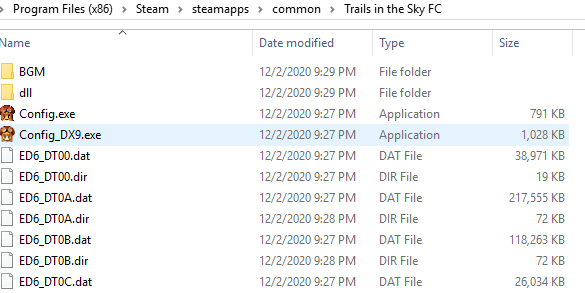
-
Optional, but recommended: download
SoraVoice_*.7zfrom SoraVoice, and extract its contents into the game directory.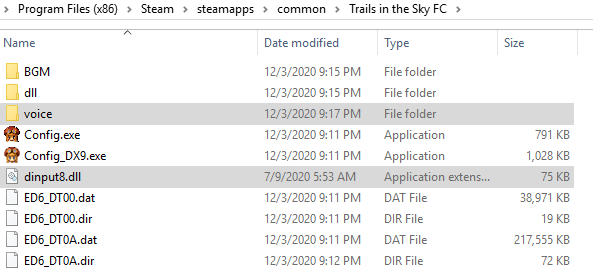
-
Download
en.fc_*.7zfrom SoraVoiceScripts. It will contain ascena/folder; place that inside thevoicedirectory.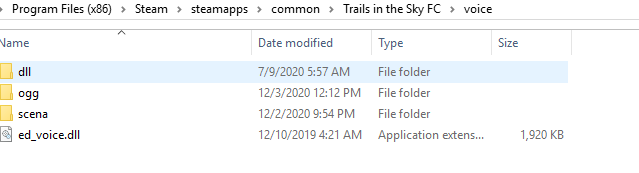
-
If you wish, install the voice files themselves. These are most easily downloaded from archive.org. The voice files go in the
oggdirectory, depicted above. -
Install LB-ARK and run its
move_sora_voice.ps1script. This is a small system that simplifies various aspects of Sky's file handling. -
Check that the mod is running. An easy way to do this, aside from just checking if there are voices playing, is that it will create a file named
ed_voice.iniin thevoicedirectory. If this file is not created, something went wrong.
If you've gotten curious and looked inside the ._sn files, you may have
noticed that they are just binary data. This format is suited for the game to
read, but it is not readable by humans. To convert them to something that is
useful for humans, we will use Calmare. Simply download the latest
calmare.exe and place it somewhere easily accessible.
Next, go to data\ED6_DT01 and drag c0100._sn onto calmare.exe. A c0100.clm
file will appear next to it, with a (hopefully) nice and readable syntax. To
convert back to ._sn, simply drag the .clm file onto calmare.exe again.
Hopefully, this guide will help you, aspiring Sky modder, set up your game to properly mod your game!
As you may expect, prior experience with coding/scripting is extremely beneficial. However, this guide is aimed to be accessible even for those who have not programmed in the past. Each line of code that we examine will be explained via comments, so we hope this will be easy to understand even for the newest of bracers!
Step 1: Character Dialogue
In the previous step, we used Calmare to create the file c0100.clm. Let's
open it and take a look!
calmare fc scena
scena:
	name "Rolent" "C0100.x"
	town town[14]
	bgm bgm[30]
	item fn[0,65535]

entry:
	pos (25000, 0, 9000)
	chr 4
	angle 0deg
	cam_from (0, 9500, -10000)
	cam_at (0, 0, 0)
	cam_zoom 2800
	cam_pers 262
	cam_deg 315deg
	cam_limit 0deg 360deg
	north 0deg
	flags 0x0000
	town town[14]
	init fn[0,0]
	reinit fn[0,1]
There's a lot of content in here, much of which is still not understood. For the purposes of this tutorial, we aren't going to be covering every line of code you'll find in these scripts. However, scroll further down in the file and there will be more easily parsed content: dialogue. Let's take a look at this line of dialogue.
	Emote name[0] 0mm 2000mm 8 9 250ms 2
	SoundPlay sound[15] 0 0 100
	Sleep 1000ms
	TextTalk name[0] {
		#00631v#001FPsych! I've got it right here!{wait}
	} {
		#00632v#001FLet's go make that delivery,
		shall we?{wait}
	}
	TextWait
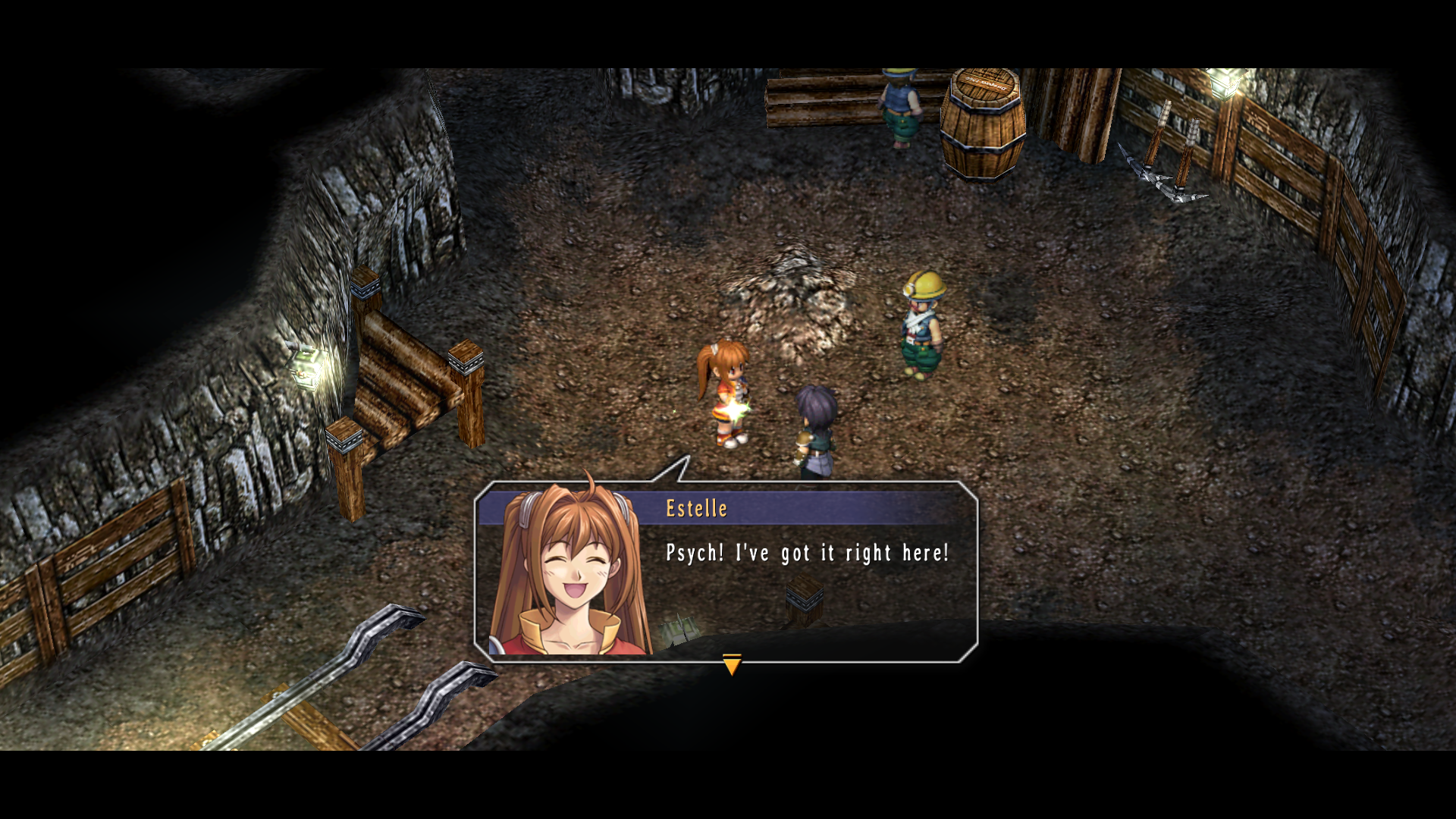
This is from a scene in the Malga Mine in Rolent early in FC, right after
Estelle and Joshua acquire a large chunk of septium. As seen here, dialogue is
written out in plain text within this TextTalk instruction. When the game
reaches this part of the script, Estelle will say this dialogue.
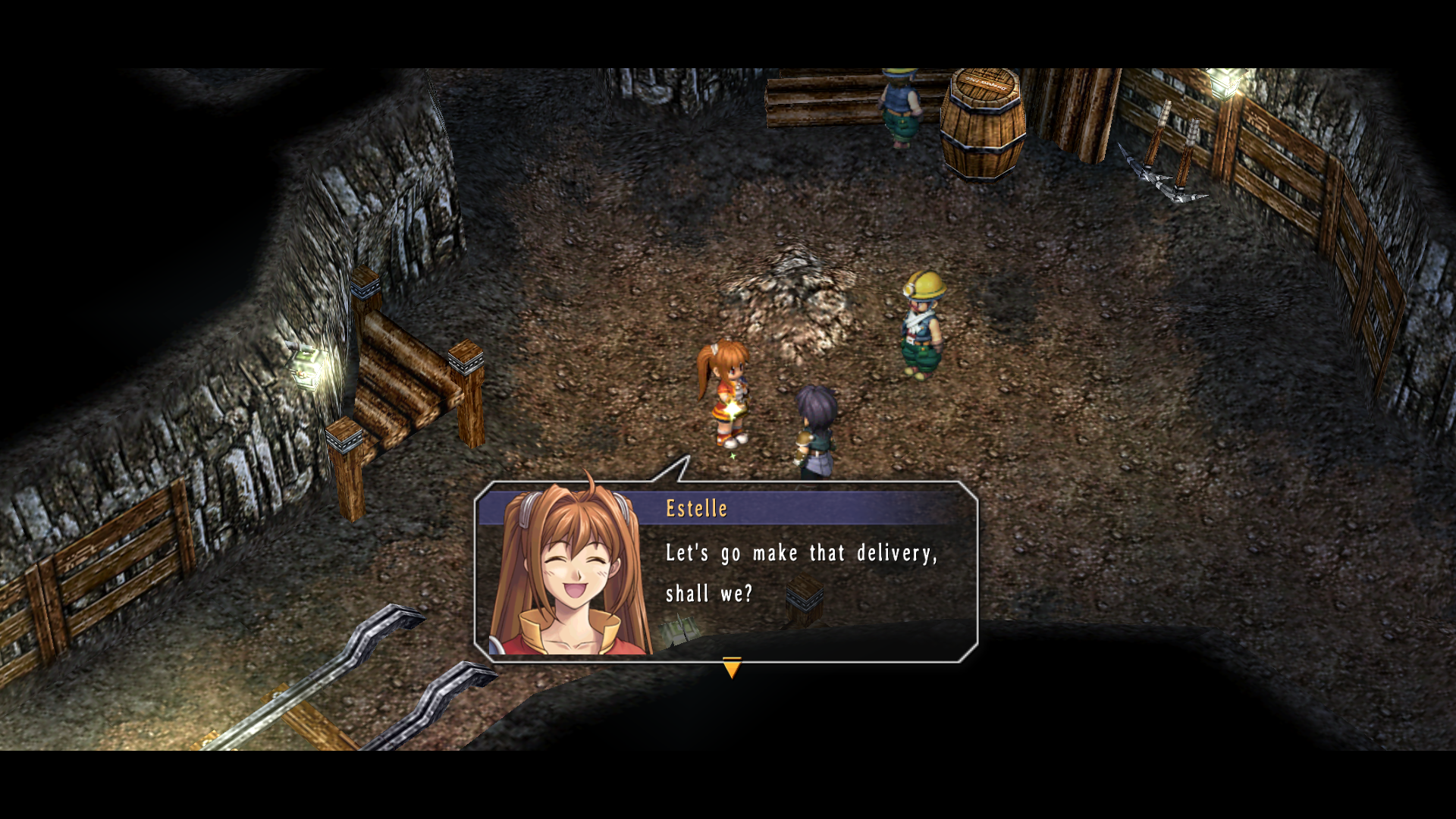
	TextTalk name[0] {
		#00631v#001FPsych! I've got it right here!{wait}
	} {
		#00632v#001FLet's go make that delivery,
		shall we?{wait}
	}
	TextWait
Most of this should be fairly self-explanatory, but there are a number of things to note:
-
name[0]refers to Estelle. What each number there refers to is defined in a file namedt_name._dt, but for now, just remember thatname[0]is Estelle andname[1]is Joshua. -
Line breaks inside the dialogue are kept as-is.
-
#00631v- Syntax like this is used for various kinds of text formatting and similar. Thevspecifier, like here, it is used to play voice clips with the dialogue. The Crossbell games use capitalV, which maps directly to files indata/voice. Lowercasevlike here comes from SoraVoice, and uses a mapping defined here. -
#001F- TheFspecifier sets the portrait that is shown next to the text. It refers to the fileh_kao###._ch1 (顔 kao is Japanese for "face"). -
A more in-depth tutorial on text formatting can be found in Appendix A;
-
{wait}- Tells the game to wait for the user to press a key before continuing. You'll see this one on almost every dialogue box. -
TextWait- Waits for the previous dialogue box be closed by the user. Again, you'll see this on almost every dialogue.
Now, let's change the portraits and dialogue:
	TextTalk name[0] {
		#00631v#414FIt's best girl Josette!{wait}
	} {
		#00632v#855FCuteness is justice,
		right?{wait}
	}
	TextWait
Save the file and drag it onto calmare.exe. Finally, the first fruits of your
labor can be seen!
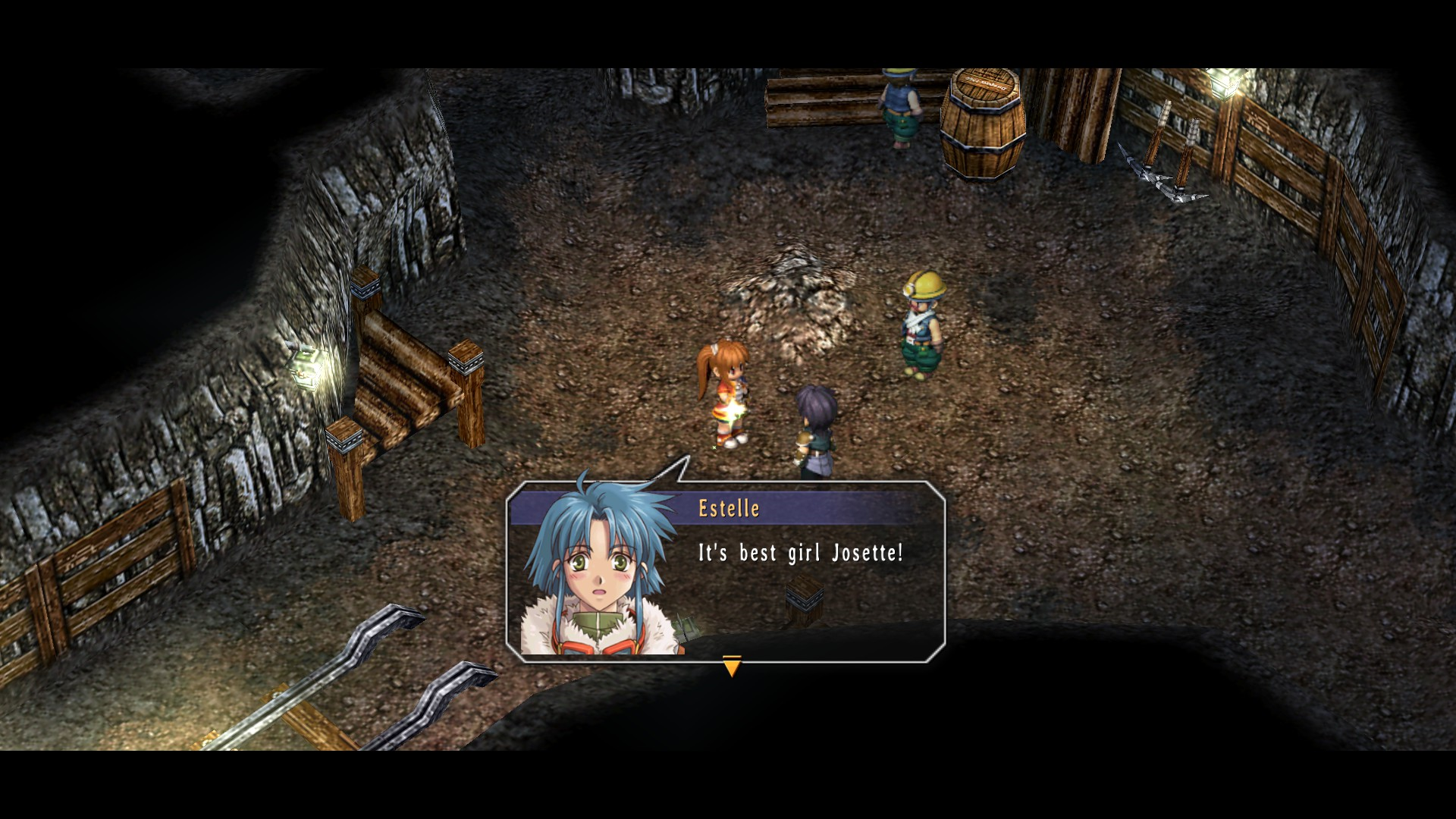
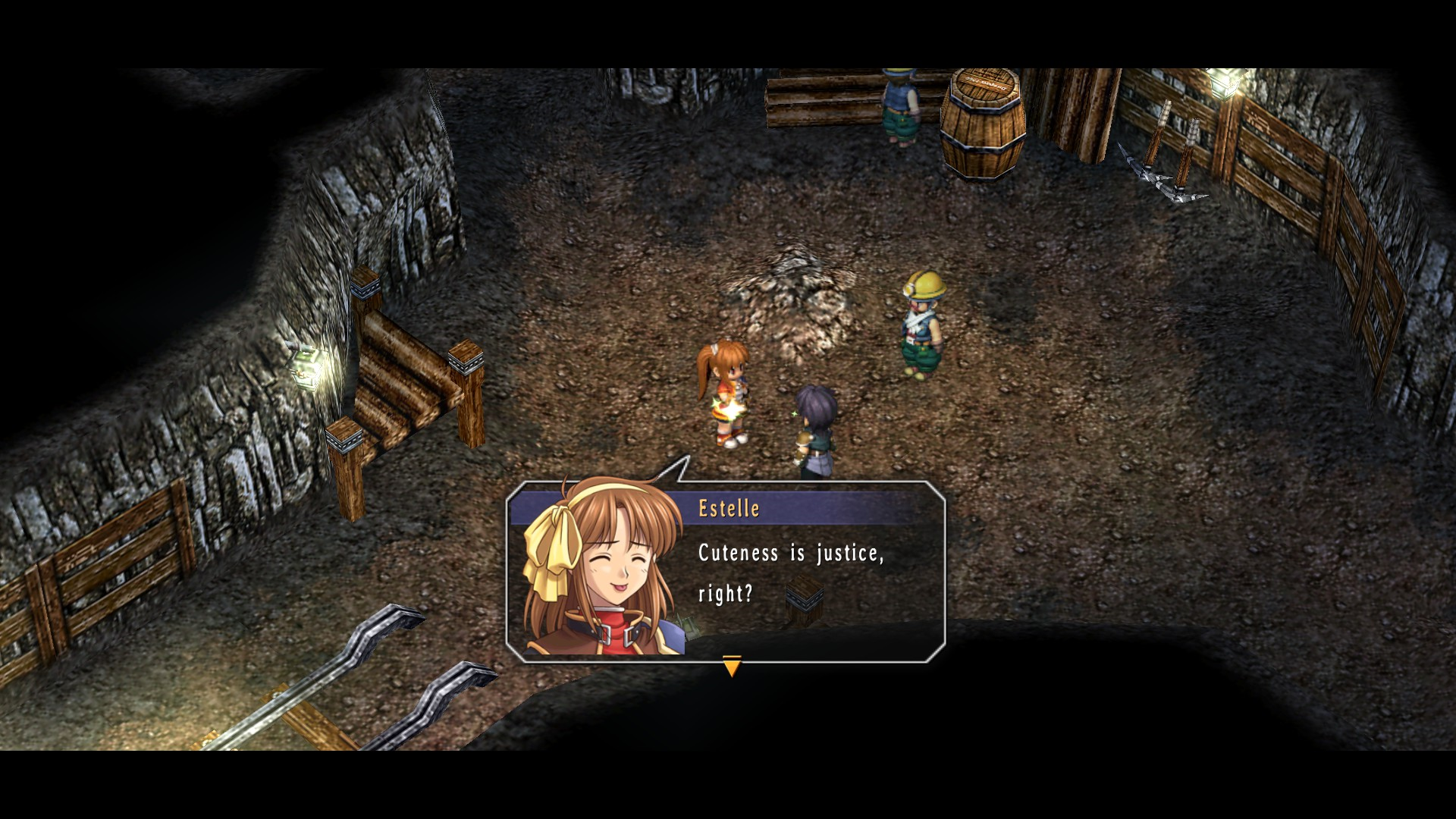
As seen above, it is possible to change the dialogue and the shown portraits!
In later games you may see four-digit numbers. They map to h_ka####._ch,
with the "o" being cut off.
Step 2: Character Movement
Now that we've gone over the basics of changing text, the next thing we'll
cover is character movement. The first thing we'll cover is putting a character
at a specific point on the map. To do so, we can use CharSetPos (set character
position).
Continuing to examine c0100.clm, let's look a little further up in the file,
at this code block:
fn[15]:
	EventBegin 0
	CharSetPos char[7] (27100, -500, 13125) 180deg
	CharSetPos name[0] (26230, 0, 10530) 0deg
	CharSetPos name[1] (27600, 0, 10640) 0deg
	CharSetPos char[3] (39350, 0, 26280) 0deg
	CharSetPos char[4] (24110, -40, 15950) 0deg
	CharSetPos char[5] (10800, 0, 29530) 0deg
	CharSetPos char[6] (54240, 0, 53990) 0deg
	ItemRemove item[802] 1
	_Char4A char[7] 0
	SystemFlagsUnset 0x00000001
	CamLookChar name[0] 0ms
	TextTalk char[7] {
		#26815vI apologize for getting you involved
		in more than your fair share of work
		today.{wait}
	}
	TextWait
The first thing to note here is that there is a fn[15]: line right at the
top. Each scena file has a bunch of functions that correspond to various events
that happen at a specific location. As we've mentioned, c0100 relates to the
Malga Mine, so all the events and dialogue in this file take place in Malga
Mine.
So how does this relate to CharSetPos? As different story events will have
different characters standing in different places, the scena file needs to tell
the game where to place characters. Oftentimes, this means that at the top of a
function, you will see a bunch of CharSetPos to place all the characters at the
correct positions. You can use these as a reference whenever you need to set a
character's position!
Now, let's take a look at CharSetPos itself.
CharSetPos name[0] (26230, 0, 10530) 0deg
You may notice that some lines say char[n] while others say name[n]. These
are different ways to refer to characters. Unlike name[n], which refers to a
global set of characters that is the same in every script, char[n] refers to NPCs (or
monsters) defined in the current scena file. You will also frequently encounter
self and null, as well as a few less common kinds.
Okay, so we can select an individual character and change their position and rotation. Let's try doing that right after our new lines of dialogue!
	TextTalk name[0] {
		#00631v#414FIt's best girl Josette!{wait}
	} {
		#00632v#855FCuteness is justice,
		right?{wait}
	}
	// CharSetPos name[0] (26230, 0, 10530) 0deg
	CharSetPos name[0] (25530, 0, 10530) 0deg
Along the bottom here, we've added two new lines of code. The first line is
directly copied from the top of the function, but we've placed a // in front,
which makes this a comment. For those new to coding, this means that this line
of code won't do anything -- it is just text to make it easier for you to read
your code! In this case, it is here to be a reference for the second line of
code.
Now, for the second line of code, we've changed the second parameter, the X position. As we've decreased the X position, we should expect our character, Estelle, to move in some direction. Let's see what happens!
As expected, Estelle has moved! More specifically, Estelle has moved up to the top left and has rotated to face the top right. This indicates to us that negative X points to the top left. 0° rotation corresponds to looking at the top right. This will be useful to keep in mind!
Next, let's modify the second line of code again. We'll change the X-position back to what it was before, and we'll change the Z position to a lower value. Finally, we'll rotate Estelle to 90°. Considering that Estelle previously moved to the top left, we should Estelle to move in a different direction this time. Let's try it!
	// CharSetPos name[0] (26230, 0, 10530) 0deg
	CharSetPos name[0] (26230, 0, 10000) 90deg
As expected, Estelle no longer moves to the top left. Instead, she moves to the bottom left this time! She also no longer turns to face the top right. She instead stays facing the bottom right.
Testing these two different scenarios has helped us figure out how the X axis and Z axis are oriented. As a rule, the positive Z axis corresponds to 0°, and the positive X axis corresponds to 90°, in a clockwise orientation. A diagram for this is provided below:
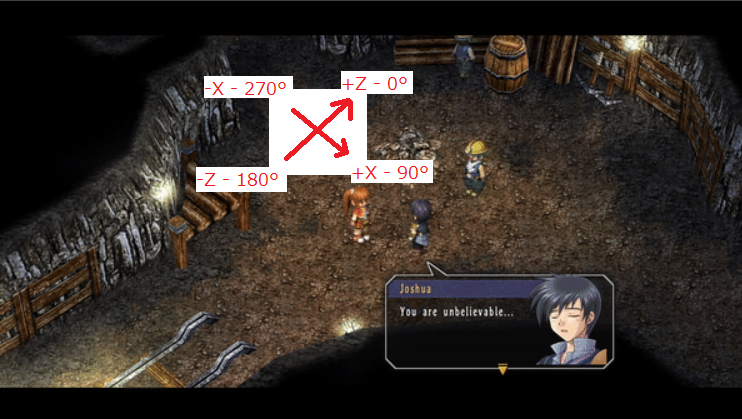
Unfortunately, considering that it is possible to rotate the camera, there is no guarantee that the Z axis is pointing towards the top right specifically. The compass on the minimap might be of use here, since 0° is to the north1.
There is also currently no way to figure out exactly which coordinates correspond to which part of the map without trial and error. As a result, it will require some testing to get your characters facing and moving in the correct directions. Please keep that in mind as you are working with character location!
This is not strictly true: I believe the north field on entry chunks
affect the relation between coordinates and the compass. This field is only
nonzero in three places throughout the entire series, however, so it can
generally be disregarded.
Being able to set a character's position provides us with one useful tool for modifying scena files, but of course, characters do not typically teleport from one location. Is there a way to have our characters walk around in a more natural fashion? The answer is yes!
Let's take a look at the start of FC at the Bright household, when Estelle
finds Joshua playing harmonica. This is t0301.
Here, we have a basic example of Estelle walking towards Joshua. How does Estelle walk to Joshua? Let's examine the code!
	Fork name[0] fork[1]:
		CamLookPos (-6350, 3450, 3460) 2000ms
	CharWalkToPos name[0] (-6220, 3450, 2860) 2000mm/s 0
	CharTurnToChar name[0] char[0] 400deg/s
	Sleep 100ms
	CharTurnToChar char[0] name[0] 400deg/s
There used to be a mess here, but our maintenance team finally finished at
Russell's and had time to look this over. So now it's up to us to create a new
mess of our own. Let's change that 2000mm/s to make Estelle walk faster!
CharWalkToPos name[0] (-6220, 3450, 2860) 5000mm/s 0
Instead of walking leisurely to Joshua, Estelle instead bursts over! We can actually compare the two different clips to see how much faster she is moving:
Indeed, now that we've changed the movement speed, Estelle moves a lot faster! You may also notice that Estelle uses a different running animation here. That's certainly convenient, since if a character moves at running speed we generally do want them to have a running animation. The threshold for this is not yet known, though.
Combined with our previous knowledge of how to figure out our coordinates, we can now have our characters walk to any point at any speed...
...Except, of course, if we ask our characters to move to a place they can't physically walk to. Whether it be walking outside the map or walking into a wall, there are some potentially weird behaviors that will occur if we don't select our destinations properly. What happens if, instead of asking Estelle to walk to Joshua, we ask her to keep walking past him towards the left?
CharWalkToPos name[0] (-10000, 3450, 0) 2000mm/s 0
Welp. As you can see, the game will not check if the path is valid before
running the script. As a result, poor selection of destinations can result in
some... unexpected behaviors, such as passing through walls. There are also other
cases where characters can get stuck walking forever if they are trying to walk
through an object (a solid wall, another character, etc.) with collision.
Please be careful with using CharWalkToPos!
One thing you may have noticed with this scene is that Estelle turns to look at Joshua before continuing her dialogue with him. Perhaps unsurprisingly, characters turn to look at each other all the time. Certainly, when characters walk/run, they will face the way they're moving, but it would be convenient to rotate characters without having to move them, right?
Luckily, we have a tool for this! Let's look at the code again for
CharTurnToChar:
	CharTurnToChar name[0] char[0] 400deg/s
	Sleep 100ms
	CharTurnToChar char[0] name[0] 400deg/s
It looks like CharTurnToChar is used twice here, and the values are just
flipped around between the first and second times. So how does CharTurnToChar
work?
CharTurnToChar is an instruction that makes one character turn to face
another over a period of time. Let's test out what happens when we change the
speed of CharTurnToChar and place a much lower number.
	// CharTurnToChar name[0] char[0] 400deg/s
	CharTurnToChar name[0] char[0] 50deg/s
Estelle definitely takes a little bit longer to turn here! To get a full appreciation of the difference, let's compare this clip (right) with the clip from the unmodded scene (left).
Using CharTurnToChar, you'll be able to have your characters look at each other
as they're talking to each other!
CharTurnToChar is a simple but powerful tool, as it allows characters to look
at each other without figuring out any angles or rotations. However, the more
astute bracers might have noticed that this perk is also its greatest
limitation -- how can characters look in a direction if no one is standing
there? For that, we can use CharTurnTo!
Let's take a look at a scene in the FC prologue, where Schera is talking to
Estelle and Joshua about becoming junior bracers. Estelle turns to (rightfully)
praise Aidios2 when she realizes she doesn't need to take a paper
test. This is t0100.
	TextTalk name[0] {
		#00157v#004F...{wait}
	} {
		#00158v#007FWhat a relief!{wait}
	}
	TextWait
	CharTurnTo name[0] 225deg 400deg/s
	SoundPlay sound[137] 0 0 100
	Emote name[0] 300mm 1600mm 54 57 250ms 0
	Sleep 1000ms
Well, you guessed it. This works almost identically to CharTurnToChar. We
still have the ID for the character that is turning and the speed at which the
character is turning. The only difference is that second parameter; instead of
a specific character to turn towards, we instead will specify the specific
direction itself. If you've already had a chance to practice specifying
directions with CharSetPos, this is the same thing!
Let's practice again by changing which way Estelle is turning:
CharTurnTo name[0] 135deg 400deg/s
As expected, Estelle turns to the right this time. Now, we have a way of having our characters turn whatever direction we like!
The final thing to note is that, as CharTurnToChar and CharTurnTo specify a
speed of turning, longer turns will require a longer period of time. Let's
compare the original turn to face downward (left) with our new turn to face
rightward (right).
Despite starting their turn at the same time, our Estelle on the right has further to turn, so it's no surprise that she ends up taking more time. This is normally what you would want, but it is worth keeping in mind as you're moving and turning your characters.
With that in mind, you have now learned the basics of how to move and turn your characters! Combined with your knowledge of character dialogue, this should already be enough to start making simple edits and scenarios. But what if your scenario needs something… more? Our beloved Sky cast is quite expressive, so we need a way to have our characters show emotion beyond their portraits.
The next step is learning about emotes!
Interesting that she turns to face the camera for that. Hmm, implications.
Step 3: Emotes
Our Sky cast often uses emotes to express different sentiments, both while they're talking and in response to other characters. Emotes provide a lot of charm and help liven up dialogue, so while not essential to telling a story, they are an excellent complement. How do we use emotes?
Let's take a look at a scene in the FC prologue, when Estelle and Joshua are
talking to businessman Orvid about a mushroom he wants them to collect. This is
t0700.
Estelle doesn't comprehend the unnecessarily snarky insinuation Orvid makes. The code for this sequence is:
	TextTalk self {
		#27019v...Oh well, I guess you'll
		have to do.{wait}
	}
	TextWait
	Emote name[0] 0mm 2000mm 0 1 250ms 2
	SoundPlay sound[38] 0 0 100
	Sleep 400ms
	TextTalk name[0] {
		#06102v#501FPardon?{wait}
	}
	TextWait
Here's one example of self being used. Since this function was invoked by
talking to Orvid, self refers to him. There's no reason they couldn't just
have written char[5] here, but that's how it is.
Let's take a closer look at this line.
Emote name[0] 0mm 2000mm 0 1 250ms 2
The name[0] is, of course, which character does the emoting -- Estelle. The
0mm and 2000mm are horizontal and vertical offset, respectively. Horizontal
offset is almost always zero, except for example if the character is lying in a
bed. Vertical offset is usually 2000mm for most characters, 1700mm for Tita or
other children, as well as characters who are sitting down, and 2300mm for Zin.
So what's the deal with the four other parameters? Well, the game has a single
instruction that is used to generate all the emotes, as opposed to one
instruction for each emote. The game contains a file that contains all of the
emote images laid out in a grid, named h_emotio._ch. Here's what h_emotio
looks like:
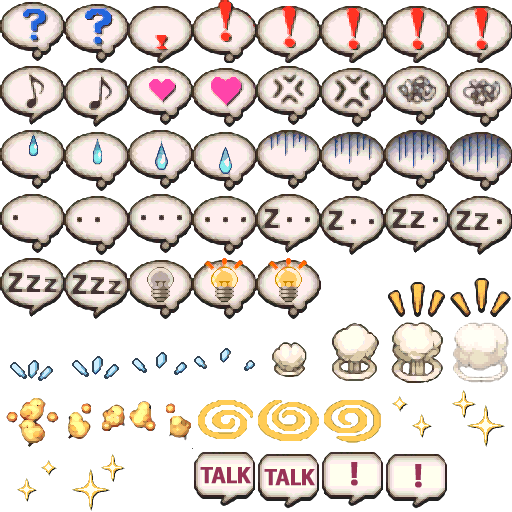
So 0 1 250ms 2 means showing images 0 through 1 (the question mark ones), for
250ms each, and run this animation twice. Some emotes such as the exclamation
mark are shown just once, with short time between each frame. Others, such as
the question mark here, have longer but fewer frames, and repeated several
times. The Emote instruction can handle all that.
A leaked script file has revealed names for a few of the emotes:
| Name | Content | Meaning |
|---|---|---|
BIKKURI | 2 7 80ms 1 | exclamation mark |
RUNRUN | 8 9 250ms 2 | music note |
MUKA | 12 13 250ms 2 | angry |
HIYAASE | 16 19 250ms 1 | sweatdrop |
TENTENTEN | 24 27 250ms 0 | ... |
ZZZ | 28 33 250ms ? | sleep |
WAIWAI | 38 39 250ms 2 | cheerful |
Okay, so it seems like we have a handle on how to make emotes appear. Let's
change Estelle's reaction to Orvid's snide comment to a nice MUKA!
Emote name[0] 0mm 2000mm 12 13 250ms 2
At the risk of being emotionally manipulative, we've now changed Estelle's reaction!
But, something feels a little off about this. In fact, the sound effect hasn't changed! A lot of these emotes have a little sound effect that plays concurrently. The question mark and anger emotes have different sound effects, but we're still currently playing the question mark emote's sound effect. What's going on here?
In fact, Emote only handles the visuals for these emotes. The sound effects
are handled by the next line of code that appears, in SoundPlay. Which you
might have guessed from the name.
SoundPlay sound[38] 0 0 100
Please note that the arguments other than the first are unknown. In fact, they seem to differ between the Liberl and Crossbell games! But for the most part you'll only need to care about the first.
The only challenge is knowing which sound effects go with which emote. They
correspond to files named ed6se###.wav. There is no comprehensive list of
what each of them means, but here's a short list of common ones:
| ID | Meaning |
|---|---|
sound[6] | open door |
sound[7] | close door |
sound[15] | happy emote (Heart, music note) |
sound[17] | received item |
sound[38] | question mark |
sound[39] | exclamation mark |
sound[49] | unhappy emote (anger, sweat drop, despair) |
So in this case we will want to change the sound[38] to a sound[49].
There are also some emotes (the three panic sweat drops, thinking ellipsis)
that don't have any sound effect associated with them -- any time you find them
in the scena files, you'll notice that there is no call to SoundPlay. While we
don't have as comprehensive a list as we'd like, we now have a way to both show
and hear our emotes!
However, there is still a little bit more to learn about showing emotes in a natural manner. If we take a look at the code again, we'll find a very unassuming, but very important instruction between the ones we have learned thus far.
	TextTalk self {
		#27019v...Oh well, I guess you'll
		have to do.{wait}
	}
	TextWait
	Emote name[0] 0mm 2000mm 12 13 250ms 2
	SoundPlay sound[38] 0 0 100
	Sleep 400ms
	TextTalk name[0] {
		#06102v#501FPardon?{wait}
	}
	TextWait
What is this Sleep instruction? If you know programming terminology, you'll
probably have guessed that it simply makes the script pause for the specified
duration. This is essential to making scenes flow at the right pace.
This instance of Sleep is seen between an emote and dialogue, but there are
many places where Sleep can be used to get the correct timing! If something
feels off about the pacing of your scripts, there's a good chance that a
well-placed Sleep or two are exactly what you're looking for.
Pretty simple in functionality, but Sleep is a deceptively powerful tool for
making the game just FEEL good. Let's take a look at what would happen if we
remove Sleep altogether from the original scene.
	Emote name[0] 0mm 2000mm 12 13 250ms 2
	SoundPlay sound[38] 0 0 100
	// Sleep 400ms // Removing sleep
	TextTalk name[0] {
		#06102v#501FPardon?{wait}
	}
	TextWait
The emote kinda overlaps with the dialogue and feels a bit rushed and cluttered. Sleep allows Estelle to transition more seamlessly from her emote to the dialogue!
Of course, there are limits to how liberally Sleep can be used. Let's look at what would happen if we increase the length of Sleep drastically:
	Emote name[0] 0mm 2000mm 12 13 250ms 2
	SoundPlay sound[38] 0 0 100
	Sleep 2000ms // Don't. Care. SLUMBER!
	TextTalk name[0] {
		#06102v#501FPardon?{wait}
	}
	TextWait
Pretty big difference, huh? The amount of time spent using Sleep can
significantly influence the feel of a scene, so Sleep responsibly!
The final major topic to cover regarding emotes is the indefinite emote. Up until now, we've covered emotes that naturally go away after a period of time, after a certain number of loops through the emote images. You may be wondering what it would mean for an animation to repeat zero times; well, you're in luck, because that's exactly what this section is about.
Sometimes characters will show an emote indefinitely until some other event, such as another character speaking, comes to stop the dialogue. This is done by setting the number of loops to zero. Let's test this out by giving Joshua an indefinite emote:
	TextTalk name[0] {
		#06102v#501FPardon?{wait}
	}
	TextWait
	Emote name[1] 0mm 1700mm 24 27 250ms 0
	TextTalk self {
		#27020v*cough* ...Never mind, I was just
		talking to myself.{wait}
	}
	TextWait
	TextTalk self {
		#27021vAll right, let's get down to business.
		Please excuse my lack of decorum,
		but I'm in a bit of a hurry.{wait}
	}
As expected, Joshua's emote isn't going away. We need some way to get rid of
these emotes at some point. For that, we can use EmoteStop!
	TextTalk name[0] {
		#06103v#006FSure.{wait}
	}
	TextWait
	EmoteStop name[1]
	TextTalk self {
		#27022vAt the moment, I'm looking for a rare
		mushroom called the 'Firefly Fungus'.{wait}
	}
Now, we can expect Joshua's emote to disappear once Estelle finishes her line of dialogue:
That wraps things up for the emotes section! We've now learned the process for making emotes appear and disappear, including how to make specific emotes appear at specific locations. With this tool at your disposal, your dialogue will be much livelier!
Step 4: Camera
In step 2, we covered how to make our characters move. While this can be a useful tool on its own, one limitation is that characters can't move too far without leaving the screen; even in cases where they are still on screen, it can look awkward to have characters standing along the edge of the screen. With that being the case, we can manipulate our camera in order to solve these problems and expand the limits of what our characters can do!
The primary function to cover here is CamLookPos, which directly changes the camera
position. Let's take a look at t0100 to see how this works. In this scene in
the FC prologue scene, Aina tells Estelle and Joshua that Luke and Pat have
gone missing.
fn[44]:
	EventBegin 0
	CharFlagsUnset char[0] 0x0080
	CharSetPos char[0] (51370, 0, 29175) 180deg
	ForkFunc name[0] fork[0] fn[0,45]
	ForkFunc name[1] fork[0] fn[0,46]
	ForkFunc char[0] fork[0] fn[0,47]
	ForkFunc field_party[0] fork[1] fn[0,48]
	TextTalk char[0] {
		#21591vEstelle! Joshua!
		Am I glad I found you two!{wait}
	}
	TextWait
	TextClose 0
	Sleep 100ms
	CrossFade 1000ms
	CharSetPos name[0] (49700, 0, 15020) 315deg
	CharSetPos name[1] (48380, 0, 15120) 0deg
	CharSetPos char[0] (49950, 0, 25270) 180deg
	CamZoom 3000 0ms
	CamLookPos (50250, 0, 16110) 0ms
	CamRotate 156000mdeg 0ms
	CamSetDistance 0 7000 -10000 0ms
	FadeWait
	CharWalkToPos char[0] (49200, 0, 19490) 5000mm/s 0
	TextTalk name[0] {
		#00282v#004FOh, hi, Aina!{wait}
	}
	TextWait
Specifically, we want to look at this line.
CamLookPos (50250, 0, 16110) 0ms
Let's change it!
CamLookPos (55000, 0, 16110) 0ms
Now, the camera has been shifted in the positive X direction, which is toward
the left in this case. It should be noted that the camera angle in both cases
isn't directly straight-on -- there's a slight angle to our perspective, as
specified by the CamRotate instruction. Thus, when we moved our camera along
the X axis, our view was both moved to the left and slightly upwards as well,
matching our camera rotation.
As an aside, we can also note that even though we didn't touch Estelle's dialogue at all, her text box has actually moved. Unless specified, the game will automatically place the text box, and its decision can be influenced by where the character is on screen. Please keep that in mind as you're messing with the camera position!
We have discussed changing where the camera looks at with CamLookPos. Next,
we will look at how to change where it's looking from. This is done primarily by
CamSetDistance.
CamSetDistance 0 7000 -10000 0ms
Since the camera angle that we see in the original scene doesn't look particularly peculiar, it might not be immediately clear what this line is doing in the first place. Let's remove this line of code and see what the scene looks like without this positioning!
※Please note that due to a relative lack of experience with camera positioning, some of this info may not be wholly accurate. This guide will be updated as we establish a better understanding of how it works.
It's a little bit more subtle than our CamLookPos example, but our new
version without the CamSetDistance line has the camera higher up; our
characters' sprites are smaller, and the building in the foreground is less
on-screen. Now, let's add CamSetDistance back in and change the parameters to
see what we can do.
CamSetDistance 5000 10000 -10000 0ms
Now, our camera is definitely doing something funky! It's now rotated clockwise thanks to the X-direction, and our characters are further away thanks to the Y-position. There's seldom a need for custom camera rotations for ordinary activities, but being aware of how to set camera height in particular can be quite useful.
Please note that while our example of Rolent supports full camera rotation,
there are some areas that have fixed camera angles. Such areas may not be fully
textured on all sides, so there are some limitations of how much the camera
rotation can be manipulated while retaining scene quality. As we have not done
a lot of camera rotations in our own work, there may be other bugs that we are
not aware of when it comes to using CamSetDistance.
Finally, let's look at crossfading. Luckily for us, the instruction to look for
is just called CrossFade. Piece of cake!
	CrossFade 1000ms
	CharSetPos name[0] (49700, 0, 15020) 315deg
	CharSetPos name[1] (48380, 0, 15120) 0deg
	CharSetPos char[0] (49950, 0, 25270) 180deg
	CamZoom 3000 0ms
	CamLookPos (50250, 0, 16110) 0ms
	CamRotate 156000mdeg 0ms
	CamSetDistance 0 7000 -10000 0ms
	FadeWait
	CharWalkToPos char[0] (49200, 0, 19490) 5000mm/s 0
Thank Aidios, it's a simple function with only one parameter! CrossFade takes
a snapshot of what is currently on screen, and smoothly fades that over to what
is to be displayed next. Usually, like in this example, this is followed by
instantaneously changing some character or camera positions, which produces a
this nice fading effect.
Interestingly, though, there's a second piece of the CrossFade puzzle. To
demonstrate this, let's remove the CrossFade line of code and see what
happens.
Our camera moves immediately to its new location, as we expected. However, Aina
also moves towards Estelle and Joshua a lot faster in our new version. None of
the other lines of code are altered, so why does removing CrossFade affect Aina?
This is because in our original version, Aina was waiting for the crossfade to
finish before she started her movement. Since we removed the fade, Aina was
able to start moving immediately, causing her to reach Estelle and Joshua
faster in our new version. This functionality is caused by the instruction
FadeWait!
FadeWait is even simpler than CrossFade itself! This instruction simply
tells the script to not continue any further until the fade effect1 finishes.
Aina's movement (CharWalkToPos) is after this FadeWait function, causing
the delay. Let's add back in the CrossFade, but this time, let's remove
FadeWait and see what happens!
This time, since we have reincluded the CrossFade function, we see our camera
fade, just like the original. However, since we've removed FadeWait, Aina
will begin walking even as the camera is fading; if we look closely, we can
even see Aina come into view before the effect is fully over, while in the
original, Aina only moves once the effect is completed. As a result, the
dialogue begins earlier in our modded version!
There may be times where it will be appropriate to not include FadeWait, such
as when you'd like to imply that the actions are ongoing during a fade to the
new camera angle. Other times, we might want to include it, such as if we want
to ensure characters don't speak while the camera effect is still ongoing.
FadeWait can be a useful tool for fixing up the timing of your scenes, so
please use it accordingly!
There isn't really anything that can be done with FadeWait that can't be done
just as well with Sleep, but FadeWait makes it much easier to get the
timing just right. Besides, it makes it clearer to readers of the script what
exactly it's waiting for.
We've now covered the basics of camera work with camera position and rotation and fade effects. With camera movement, your scenes will now be much more dynamic and interesting to watch!
FadeWait does not only apply to CrossFade, but a few other kinds of fading that
will covered in future sections.
Step 5: Music
Beyond the creativity aspect of making custom scenes, we can also convey messages and emotions, serious or lighthearted. Music can be important in setting the right mood for our scenes and ensure that the intended feeling is coming across. Generally speaking, all areas of Liberl will have their own themes. However, depending on the scene, the music may change or cut out altogether. We can customize our own BGM to create the proper feel for our scenes!
Let's take a look at t0121 for the scene in Rolent's Bracer Guild, when Aina
informs Estelle, Joshua, and Schera that Cassius has gone missing.
At the beginning of the scene we have the usual Rolent theme, Provincial City of Rolent. However, when Aina receives the bad news, the music gradually fades out. After a brief silence, the music switches to People Engaged in Secret Maneuvers. Here's the scene again, this time with subtitles to indicate the playing audio.
	TextTalk char[0] {
		#21716v#743F#6PYes, that's right. He left on
		business the other day...{wait}
	}
	TextWait
	BgmStop 1500ms
	Emote char[0] 0mm 2000mm 24 27 250ms 0
	Sleep 1500ms
	BgmWait
	EmoteStop char[0]
	TextTalk char[0] {
		#21717v#742F#3S#6PWhat?!{wait}
	}
	Shake 0 200 3000 100ms
	TextWait
	CharTurnToChar name[1] char[0] 400deg/s
	CharTurnToChar name[0] char[0] 400deg/s
	BgmPlay bgm[81] 0
	Sleep 400ms
	TextTalk char[0] {
		#21718v#745F#6PI apologize, but this is a little
		difficult to believe...{wait}
	} { ... }
Here, the instructions to look for are BgmStop, BgmWait, and BgmPlay.
BgmStop makes the music fade out over the specified duration. This often
feels more organic than having it just stop suddenly -- though a sudden stop
could also be effectful sometimes.
BgmWait is similar to FadeWait, as discussed in the previous chapter. It
makes the script wait until the BgmStop has finished -- it may otherwise
feel janky to have the scene progress while the audio is still fading out.
Finally, BgmPlay tells the game to start playing a new track. The way these
IDs map to filenames is done through a file called t_bgmtbl._dt. Calmare does
not currently handle this file, though this is intended to be added in the future.
However, all hope is not lost: the Evolution versions of the games include a more readable form of these tables, which I have included here. (Click to expand.)
Trails in the Sky FC
;===BGMテーブル===
;---ファイル名は必ず6文字で---
;曲番号定義

#define			BGM_Nothing		00000		;
#define			BGM_Title		00001		; タイトル
#define			BGM_Opening1	00002		; 前編オープニング
#define			BGM_StaffRoll1	00003		; 前編スタッフロール
#define			BGM_Chapter		00004		; 章間ビジュアル
#define			BGM_Preview		00005		; 後編予告
#define			BGM_Opening2	00006		; 後編オープニング
#define			BGM_StaffRoll2	00007		; 後編スタッフロール
#define			BGM_Logo		00008		; ロゴの音

; 街関係
#define			BGM_Town		00010		;
#define			BGM_Rolent		00010		; 地方都市ロレント・ブライト家
#define			BGM_Bose		00011		; 商業都市ボース
#define			BGM_Ruan		00012		; 海港都市ルーアン
#define			BGM_Zeiss		00013		; 工房都市ツァイス
#define			BGM_Grancel		00014		; 王都グランセル・王立学園
#define			BGM_Village		00015		; 村、一軒家
#define			BGM_Sekisyo		00016		; 関所
#define			BGM_Castle		00017		; グランセル城
#define			BGM_Arena		00018		; 王立競技場

; 道関係
#define			BGM_Field		00020		; 街道
#define			BGM_Forest		00021		; 森
#define			BGM_Mountain	00022		; 山、峡谷

; ダンジョン関係
#define			BGM_Cave		00030		; 洞窟系ダンジョン
#define			BGM_Structure	00031		; 建物系ダンジョン
#define			BGM_Cave2		00032		; 鍾乳洞
#define			BGM_Tower		00033		; 塔
#define			BGM_Fortress	00034		; レイストン要塞
#define			BGM_SealArea	00035		; 地下封印区画(前編ラスダン)

; 戦闘関係
#define			BGM_Battle00	00040		; 通常戦闘
#define			BGM_Battle10	00041		; 通常戦闘ピンチ
#define			BGM_Battle20	00042		; 中ボス戦闘
#define			BGM_Battle30	00043		; 大ボス戦闘
#define			BGM_Battle40	00044		; 闘技場バトル
#define			BGM_Battle41	00045		; 前編ラスボス戦闘
#define			BGM_Battle42	00046		; 後編ラスボス戦闘
#define			BGM_Battle50	00047		; 戦闘勝利
#define			BGM_GameOver	00048		; ゲームオーバー


#define			BGM_TakeOver	00060		; 引き継ぎ

; イベント関係
#define			BGM_Harmoni		00070		; ヨシュアのハーモニカ
#define			BGM_ED6501		00071		; オリビエのリュート
#define			BGM_ED6502		00072		; オリビエのピアノ
#define			BGM_ED6503		00073		;
#define			BGM_ED6504		00074		; 星のありか(ハーモニカ長・別れ前)
#define			BGM_ED6505		00075		; ?

#define			BGM_Sadness		00080		; 悲哀イベント(火事、誘拐後など)
#define			BGM_Plot		00081		; 陰謀、悪巧み、不安
#define			BGM_Chase		00082		; 追跡、脱出、追撃など
#define			BGM_Remember	00083		; 回想(ヨシュア以外)
#define			BGM_Night		00084		; 夜のシーン

#define			BGM_Tension		00086		; 緊迫、緊張
#define			BGM_Airpirates	00087		; 空賊団のテーマ
#define			BGM_Festival	00088		; お祭り、旅立ち
#define			BGM_ErbeAttack	00089		; エルベ離宮急襲
#define			BGM_Weissman	00090		; ワイスマンがヨシュアの暗示を解く
#define			BGM_Joshua		00091		; ヨシュアのテーマ~別れ~
#define			BGM_Gospel		00092		; 黒のオーブメント発動、封印解除
#define			BGM_Army		00101		; 王国軍のテーマ

#define			BGM_Drama1		00093		; 姫の悩み
#define			BGM_Drama2		00094		; 騎士たちの嘆き
#define			BGM_Drama3		00095		; それぞれの思惑
#define			BGM_Drama4		00096		; 城
#define			BGM_Drama5		00097		; コロシアム
#define			BGM_Drama6		00098		; 決闘
#define			BGM_Drama7		00099		; 姫の死
#define			BGM_Drama8		00100		; 大団円


;---------------------------------------------------------------------


//BGMテーブル定義

;システム系
//tbl	BGM_NO			  filename	 LOOP	LoopStart	  LoopEnd			Comment
bgmtbl	BGM_Title			ed6001		1	 00562871	 03140411
bgmtbl	BGM_Opening1		ed6002		0			0			0			;前編オープニング
bgmtbl	BGM_StaffRoll1		ed6003		0			0			0			;前編スタッフロール
bgmtbl	BGM_Chapter			ed6004		0			0			0			;章間ビジュアル
bgmtbl	BGM_Preview			ed6005		0			0			0			;後編予告
bgmtbl	BGM_Opening2		ed6006		0			0			0			;後編オープニング
bgmtbl	BGM_StaffRoll2		ed6007		0			0			0			;後編スタッフロール
bgmtbl	BGM_Logo			ed6008		0			0			0			;ロゴ

;街関係
bgmtbl	BGM_Rolent			ed6100		1	 00021825	 06145560			;地方都市ロレント・ブライト家
bgmtbl	BGM_Bose			ed6101		1	 00125210	 04358193			;商業都市ボース
bgmtbl	BGM_Ruan			ed6102		1	 00256040	 04779868			;海港都市ルーアン
bgmtbl	BGM_Zeiss			ed6103		1	 00585462	 05629787			;工房都市ツァイス
bgmtbl	BGM_Grancel			ed6104		1	 00445158	 07620480			;王都グランセル・王立学園
bgmtbl	BGM_Village			ed6105		1	 00177760	 06549752			;村、一軒家
bgmtbl	BGM_Sekisyo			ed6106		1	 00139860	 05000310			;関所
bgmtbl	BGM_Castle			ed6107		1	 00209832	 05312397			;グランセル城
bgmtbl	BGM_Arena			ed6108		1	 00573440	 03933876			;王立競技場

;道関係
bgmtbl	BGM_Field			ed6200		1	00103934	 06513551			;街道
bgmtbl	BGM_Forest			ed6201		1	00131072	 02610720			;森
bgmtbl	BGM_Mountain		ed6202		1	00626688	 02466175			;山、峡谷

;ダンジョン関係
bgmtbl	BGM_Cave			ed6300		1	00197561	04736550			;洞窟系ダンジョン
bgmtbl	BGM_Structure		ed6301		1	00548864	03722338			;建物系ダンジョン
bgmtbl	BGM_Cave2			ed6302		1	00101928	04524660			;鍾乳洞
bgmtbl	BGM_Tower			ed6303		1	00107797	04803065			;塔
bgmtbl	BGM_Fortress		ed6304		1	00262144	05699077			;レイストン要塞
bgmtbl	BGM_SealArea		ed6305		1	00505412	12110652			;地下封印区画(前編ラスダン)

;戦闘関係
bgmtbl	BGM_Battle00		ed6400		1	00172199	05629787			;通常戦闘0

bgmtbl	BGM_Battle10		ed6410		1	00835516	04091456			;通常戦闘0ピンチ

bgmtbl	BGM_Battle20		ed6402		1	00389298	04557007			;中ボス戦闘0

bgmtbl	BGM_Battle30		ed6403		1	00391604	04884924			;大ボス戦闘0

bgmtbl	BGM_Battle40		ed6404		1	00299275	04417670			;闘技場バトル
bgmtbl	BGM_Battle41		ed6405		1	00324096	05412960			;前編ラスボス戦闘1
bgmtbl	BGM_Battle42		ed6406		1	00947015	04536452			;前編ラスボス戦闘2

bgmtbl	BGM_Battle50		ed6407		1	00308235	01644815			;戦闘勝利
bgmtbl	BGM_GameOver		ed6408		1	00393216	03799004			;ゲームオーバー

bgmtbl	BGM_TakeOver		ed6600		1			0			0			;引き継ぎ

;イベント関係
bgmtbl	BGM_Harmoni			ed6500		0	00000000	00000000			;ヨシュアのハーモニカ
bgmtbl	BGM_ED6501			ed6501		0	00000000	00000000			;オリビエのリュート(ハミング付き)
bgmtbl	BGM_ED6502			ed6502		0	00000000	00000000			;オリビエのピアノ
bgmtbl	BGM_ED6503			ed6503		1	00020987	03000017			;オリビエのリュート(インスト)
bgmtbl	BGM_ED6504			ed6504		1	00509184	03855360			;星のありか(ハーモニカ長・別れ前)
bgmtbl	BGM_ED6505			ed6505		1	00859198	05137866			;学園祭、生誕祭

bgmtbl	BGM_Sadness			ed6510		1	00176287	02787839			;悲哀イベント
bgmtbl	BGM_Plot			ed6511		1	00306671	04536712			;陰謀、悪巧み、不安
bgmtbl	BGM_Chase			ed6512		1	00275592	03739288			;追跡、脱出、追撃など
bgmtbl	BGM_Remember		ed6513		1	01179648	03254045			;回想(ヨシュア以外)
bgmtbl	BGM_Night			ed6514		1	00554988	04249189			;夜のシーン

bgmtbl	BGM_Tension			ed6516		1	00240097	03928078			;緊迫、緊張
bgmtbl	BGM_Airpirates		ed6517		1	00344064	03990689			;空賊団のテーマ
bgmtbl	BGM_Festival		ed6518		1	00136808	03992196			;旅立ち
bgmtbl	BGM_ErbeAttack		ed6519		1	00153494	05773171			;エルベ離宮急襲

bgmtbl	BGM_Weissman		ed6520		1	00489216	06926592			;ワイスマンがヨシュアの暗示を解く
bgmtbl	BGM_Joshua			ed6521		1	00022082	04859488			;ヨシュアのテーマ~別れ~
bgmtbl	BGM_Gospel			ed6522		1	00021760	02121984			;黒のオーブメント発動、封印解除
bgmtbl	BGM_Army			ed6523		1	00571392	03036672			;王国軍のテーマ

bgmtbl	BGM_Drama1			ed6530		1	00022386	02116750			;姫の悩み
bgmtbl	BGM_Drama2			ed6531		1	00021840	01852305			;騎士たちの嘆き
bgmtbl	BGM_Drama3			ed6532		1	00022400	02647256			;それぞれの思惑
bgmtbl	BGM_Drama4			ed6533		1	00022144	01476608			;城
bgmtbl	BGM_Drama5			ed6534		1	00050592	01881504			;コロシアム
bgmtbl	BGM_Drama6			ed6535		1	00239360	02102272			;決闘
bgmtbl	BGM_Drama7			ed6536		1	00877725	03548160			;姫の死
bgmtbl	BGM_Drama8			ed6537		1	00039675	00846699			;大団円


;---------------------------------------------------------------------------------

bgmtbl	BGM_Nothing			ed6999		0			0			0			;検索終了コード

;---------------------------------------------------------------------------------
Trails in the Sky SC
;===BGMテーブル=================================================
;---ファイル名は必ず6文字で----------------------------------------
;曲番号定義


#define		BGM_Nothing			00000		;
#define		BGM_Title			00001		; タイトル
#define		BGM_Opening1		00002		; 前編オープニング
#define		BGM_StaffRoll1		00003		; 前編スタッフロール
#define		BGM_Chapter			00004		; 章間ビジュアル
#define		BGM_Preview			00005		; 後編予告
; 後編システム
#define		BGM_Title2			00006		; 後編:タイトル画面
#define		BGM_Opening2		00007		; 後編:オープニング
#define		BGM_StaffRoll2		00008		; 後編:スタッフロール
#define		BGM_Logo			00009		; ロゴムービー

#define		BGM_Movie1			00130		; 後編:オーリオール出現&導力停止現象
#define		BGM_Movie2			00131		; 後編:オーリオール到達
#define		BGM_Movie3			00132		; 後編:アルセイユ墜落
#define		BGM_Movie4			00133		; 後編:オーリオール崩壊

; 街関係
#define		BGM_Town			00010		;
#define		BGM_Rolent			00010		; 地方都市ロレント・ブライト家
#define		BGM_Bose			00011		; 商業都市ボース
#define		BGM_Ruan			00012		; 海港都市ルーアン
#define		BGM_Zeiss			00013		; 工房都市ツァイス
#define		BGM_Grancel			00014		; 王都グランセル・王立学園
#define		BGM_Village			00015		; 村、一軒家
#define		BGM_Sekisyo			00016		; 関所
#define		BGM_Castle			00017		; グランセル城
#define		BGM_Arena			00018		; 王立競技場

; 道関係
#define		BGM_Field			00020		; 街道
#define		BGM_Forest			00021		; 森
#define		BGM_Mountain		00022		; 山、峡谷

; 後編街&道
#define		BGM_Harmel			00024		; ★後編:後編:エピローグハーメル村用、星の在り処
#define		BGM_LeLocle			00025		; ★後編:ル=ロックル峡谷
#define		BGM_TownAnxiety		00026		; ★後編:導力停止中の不安な街
#define		BGM_Arseille		00027		;  後編:巡洋艦アルセイユ
#define		BGM_Glorious		00028		; ★後編:飛行戦艦グロリアス
#define		BGM_Field2			00029		; 後編:一般街道

; ダンジョン関係
#define		BGM_Mine			00030		; 鉱山
#define		BGM_Cave			00030		; 洞窟系ダンジョン
#define		BGM_Structure		00031		; 建物系ダンジョン
#define		BGM_Cave2			00032		; 鍾乳洞
#define		BGM_Tower			00033		; 塔
#define		BGM_Fortress		00034		; レイストン要塞
#define		BGM_SealArea		00035		; 地下封印区画(前編ラスダン)

; 後編ダンジョン関係
#define		BGM_Tower2			00060		; ★後編:四輪の塔・うら
#define		BGM_Laboratory		00061		; ★後編:湖畔の秘密研究所
#define		BGM_ArcCity			00062		; ★後編:リベルアーク・地上区画
#define		BGM_ArcUnderRoad	00063		; ★後編:リベルアーク・地下道
#define		BGM_ArcPiller		00064		; ★後編:リベルアーク・中枢塔
#define		BGM_ArcCentral		00065		;  後編:リベルアーク・根源区画(無し。環境SEなどで)
#define		BGM_ArcEscape		00066		; ★後編:リベルアーク・脱出

; 戦闘関係
#define		BGM_Battle00		00040		;通常戦闘
#define		BGM_Battle10		00041		;通常戦闘ピンチ
#define		BGM_Battle20		00042		;中ボス戦闘
#define		BGM_Battle30		00043		;大ボス戦闘
#define		BGM_Battle40		00044		;闘技場バトル
#define		BGM_Battle41		00045		;前編ラスボス戦闘
#define		BGM_Battle42		00046		;後編ラスボス戦闘
#define		BGM_Battle50		00047		;戦闘勝利
#define		BGM_GameOver		00048		;ゲームオーバー

; 後編戦闘関係
#define		BGM_Battle420		00050		; ★後編:通常戦闘1
#define		BGM_Battle421		00051		; ★後編:通常戦闘2(ラスダン内など後半で)
#define		BGM_Battle422		00052		; ★後編:中ボス戦闘1(コミカル系 レイヴン、手配魔獣など)
#define		BGM_Battle423		00053		;  後編:中ボス戦闘2(シリアス系)
#define		BGM_Battle424		00054		; ★後編:大ボス戦闘(古竜、戦車など巨大メカ系)
#define		BGM_Battle425		00055		;  後編:執行者戦闘(ブルブラン/ヴァルター/ルシオラ/レン&パテル=マテル)
#define		BGM_Battle426		00056		;  後編:ラスボス1(合体ワイスマン)
#define		BGM_Battle427		00057		;  後編:ラスボス2(<輝く輪>に取り込まれた合体ワイスマン)
#define		BGM_Battle428		00058		; ★後編:ラスボス0(人間ワイスマン)
#define		BGM_Battle429		00059		; ★後編:ピンチ戦闘

; イベント関係
#define		BGM_Harmoni			00070		; ヨシュアのハーモニカ
#define		BGM_ED6501			00071		; オリビエのリュート
#define		BGM_ED6502			00072		; オリビエのピアノ
#define		BGM_ED6503			00073		;
#define		BGM_ED6504			00074		; 星のありか(ハーモニカ長・別れ前)
#define		BGM_ED6505			00075		; ?

#define		BGM_Sadness			00080		; 悲哀イベント(火事、誘拐後など)
#define		BGM_Plot			00081		; 陰謀、悪巧み、不安
#define		BGM_Chase			00082		; 追跡、脱出、追撃など
#define		BGM_Remember		00083		; 回想(ヨシュア以外)
#define		BGM_Night			00084		; 夜のシーン

#define		BGM_Tension			00086		; 緊迫、緊張
#define		BGM_Airpirates		00087		; 空賊団のテーマ
#define		BGM_Festival		00088		; お祭り、旅立ち
#define		BGM_ErbeAttack		00089		; エルベ離宮急襲
#define		BGM_Weissman		00090		; ワイスマンがヨシュアの暗示を解く
#define		BGM_Joshua			00091		; ヨシュアのテーマ~別れ~
#define		BGM_Gospel			00092		; 黒のオーブメント発動、封印解除

#define		BGM_Army			00101		; 王国軍のテーマ

#define		BGM_Drama1			00093		; 姫の悩み
#define		BGM_Drama2			00094		; 騎士たちの嘆き
#define		BGM_Drama3			00095		; それぞれの思惑
#define		BGM_Drama4			00096		; 城
#define		BGM_Drama5			00097		; コロシアム
#define		BGM_Drama6			00098		; 決闘
#define		BGM_Drama7			00099		; 姫の死
#define		BGM_Drama8			00100		; 大団円

; 後編イベント関係
#define		BGM_Organization	00110		;  後編:結社系怪しいイベント(結社絡みの陰謀、暗躍、不安)
#define		BGM_Agent			00111		; ★後編:執行者のテーマ(執行者の登場シーン)
#define		BGM_Wiseman			00112		;  後編:ワイスマンのテーマ(グロリアスでの邂逅、ラスボス戦前)
#define		BGM_Danger			00113		; ★後編:危機汎用
#define		BGM_SileverSad1		00114		; ★後編:銀の意志哀しい版・イントロ(レーヴェ、カリン、ハーメル村関連)
#define		BGM_ArcAnxiety		00115		; ★後編:オーリオール・不安(四輪の塔・表の代替曲)
#define		BGM_Army2			00116		; ★後編:軍事ミッション系(古代竜ミッション説明、人形兵に応戦する王国軍)
#define		BGM_Village2		00117		; ★後編:幻影のブライト家
#define		BGM_Return			00118		; ★後編:帰還(エンディングでレグナート登場)
#define		BGM_Silever2		00119		; ★後編:外注:銀の意志アレンジ版(オーリオールに突入、レーヴェとの決着など)
#define		BGM_Joshua2			00120		; ★後編:外注:ヨシュアとの再開(星の在り処(歌)のインストアレンジ)
#define		BGM_WisemanOrgan	00121		;  後編:ワイスマンの弾くパイプオルガン曲
#define		BGM_AppearRing		00122		;  後編:外注?:輝く環の出現ムービー(ループするように)
#define		BGM_SileverSad2		00123		; ★後編:銀の意志哀しい版・頭サビ(ヨシュアが暗示から脱して正気を取り戻す)
#define		BGM_ArcBreak		00124		;  後編:外注?:オーリオール崩壊
#define		BGM_Mist			00125		; ★後編:霧の出るイベント(ルシオラの結界、結社研究所に向かう、古竜の住処)
#define		BGM_KohakuPiano		00126		; ★後編:外注:琥珀の愛・ピアノ(オリビエとの再開)

; PSP追加した物
#define		BGM_Silever2_PSP	00140		; ed6_dt43BGM
#define		BGM_Movie2_PSP		00141		; ed6_dt44BGM
#define		BGM_Movie3_PSP		00142		; ed6_dt45BGM
#define		BGM_Movie4_PSP		00143		; ed6_dt46BGM

#define		BGM_TakeOver		00149		; 引き継ぎ

#define		BGM_ed6_dt40		00150		; ed6_dt40 効果音 グロリアス登場
#define		BGM_ed6_dt41		00151		; ed6_dt41 効果音 オーリオール出現
#define		BGM_ed6_dt42		00152		; ed6_dt42 効果音 動力停止現象
#define		BGM_ed6_dt43		00153		; ed6_dt43 効果音 グロリアス襲撃
#define		BGM_ed6_dt44		00154		; ed6_dt44 効果音 オーリオール上空
#define		BGM_ed6_dt45		00155		; ed6_dt45 効果音 アルセイユ撃墜
#define		BGM_ed6_dt46		00156		; ed6_dt46 効果音 オーリオール崩壊
#define		BGM_ed6_dt50		00157		; ed6_dt50 効果音 ワイスマン変身
#define		BGM_ed6_dt51		00158		; ed6_dt51 効果音 ワイスマン無念


;---------------------------------------------------------------------


//BGMテーブル定義


; システム系
//tbl	BGM_NO			  filename	 LOOP	LoopStart	 LoopEnd		Comment
bgmtbl	BGM_Title			ed6001	 	1	00761041	03140432		; 前編タイトル
bgmtbl	BGM_Opening1		ed6002	 	0	00000000	00000000		; 前編オープニング
bgmtbl	BGM_StaffRoll1		ed6003	 	0	00000000	00000000		; 前編スタッフロール
;bgmtbl		BGM_Chapter			ed6004	 	0	00000000	00000000		; 章間ビジュアル
bgmtbl	BGM_Preview			ed6005	 	0	00000000	00000000		; 後編予告

bgmtbl	BGM_Title2			ed6010	 	1	00809506	07453696		; 後編タイトル
bgmtbl	BGM_Opening2		ed6011	 	0	00000000	00000000		; 後編オープニング
bgmtbl	BGM_StaffRoll2		ed6012	 	0	00000000	00000000		; 後編スタッフロール
bgmtbl	BGM_Logo			ed6008	 	0	00000000	00000000		; ロゴムービー

bgmtbl	BGM_Movie1			ed6015	 	1	00623724	07441374		; 後編:オーリオール出現&導力停止現象
bgmtbl	BGM_Movie2			ed6016	 	1	02831810	04508765		; 後編:オーリオール到達
bgmtbl	BGM_Movie3			ed6017	 	1	02973664	02050080		; 後編:アルセイユ墜落
bgmtbl	BGM_Movie4			ed6018	 	1	01284486	11430903		; 後編:オーリオール崩壊

; 街関係
bgmtbl	BGM_Rolent			ed6100	 	1	00021825	06145560		; 地方都市ロレント・ブライト家
bgmtbl	BGM_Bose			ed6101	 	1	00125210	04358193		; 商業都市ボース
bgmtbl	BGM_Ruan			ed6102	 	1	00256040	04779868		; 海港都市ルーアン
bgmtbl	BGM_Zeiss			ed6103	 	1	00585462	05629787		; 工房都市ツァイス
bgmtbl	BGM_Grancel			ed6104	 	1	00445158	07620480		; 王都グランセル・王立学園
bgmtbl	BGM_Village			ed6105	 	1	00177760	06549752		; 村、一軒家
bgmtbl	BGM_Sekisyo			ed6106	 	1	00139860	05000310		; 関所
bgmtbl	BGM_Castle			ed6107	 	1	00209832	05312397		; グランセル城
bgmtbl	BGM_Arena			ed6108	 	1	00573440	03933876		; 王立競技場

bgmtbl	BGM_LeLocle			ed6110	 	1	01184275	06047711		; ★後編:ル=ロックル峡谷
bgmtbl	BGM_TownAnxiety		ed6111	 	1	00685484	05515645		; ★後編:導力停止中の不安な街
bgmtbl	BGM_Arseille		ed6112	 	1	00326284	02676419		;  後編:巡洋艦アルセイユ
bgmtbl	BGM_Glorious		ed6113	 	1	01577999	05515691		; ★後編:飛行戦艦グロリアス
bgmtbl	BGM_Harmel			ed6114	 	1	00000000	00000000		; ★後編:後編:エピローグハーメル村用、星の在り処

; 道関係
bgmtbl	BGM_Field			ed6200	 	1	00103934	06513551		; 街道
bgmtbl	BGM_Forest			ed6201	 	1	00131072	02610720		; 森
bgmtbl	BGM_Mountain		ed6202	 	1	00626688	02466175		; 山、峡谷

bgmtbl	BGM_Field2			ed6210	 	1	00760805	05404713		; 後編:一般街道

; ダンジョン関係
bgmtbl	BGM_Cave			ed6300	 	1	00197561	04736550		; 洞窟系ダンジョン
bgmtbl	BGM_Structure		ed6301	 	1	00548864	03722338		; 建物系ダンジョン
bgmtbl	BGM_Cave2			ed6302	 	1	00101928	04524660		; 鍾乳洞
bgmtbl	BGM_Tower			ed6303	 	1	00107797	04803065		; 塔
bgmtbl	BGM_Fortress		ed6304	 	1	00262144	05699077		; レイストン要塞
bgmtbl	BGM_SealArea		ed6305	 	1	00505412	12110652		; 地下封印区画(前編ラスダン)

bgmtbl	BGM_Tower2			ed6310	 	1	00816834	04274350		; ★後編:四輪の塔・うら
bgmtbl	BGM_Laboratory		ed6311	 	1	01273084	05388067		; ★後編:湖畔の秘密研究所
bgmtbl	BGM_ArcCity			ed6312	 	1	00456172	05927034		; ★後編:リベルアーク・地上区画
bgmtbl	BGM_ArcUnderRoad	ed6313	 	1	00094978	04744533		; ★後編:リベルアーク・地下道
bgmtbl	BGM_ArcPiller		ed6314	 	1	00022100	06435072		; ★後編:リベルアーク・中枢塔
bgmtbl	BGM_ArcCentral		ed6315	 	1	00048241	00426215		;  後編:リベルアーク・根源区画(無し。環境SEなどで)
bgmtbl	BGM_ArcEscape		ed6316	 	1	00905216	04997739		; ★後編:リベルアーク・脱出

; 戦闘関係
bgmtbl	BGM_Battle00		ed6400	 	1	00172199	05629787		; 通常戦闘0
bgmtbl	BGM_Battle20		ed6402	 	1	00389298	04557007		; 中ボス戦闘0
bgmtbl	BGM_Battle30		ed6403	 	1	00391604	04884924		; 大ボス戦闘0
bgmtbl	BGM_Battle40		ed6404	 	1	00299275	04417670		; 闘技場バトル
bgmtbl	BGM_Battle41		ed6405	 	1	00324096	05412960		; 前編ラスボス戦闘1
bgmtbl	BGM_Battle42		ed6406	 	1	00947015	04536452		; 前編ラスボス戦闘2
bgmtbl	BGM_Battle50		ed6407	 	1	00308235	01644815		; 戦闘勝利
bgmtbl	BGM_GameOver		ed6408	 	1	00393216	03799004		; ゲームオーバー

bgmtbl	BGM_Battle10		ed6410	 	1	00835516	04091456		; 通常戦闘0ピンチ

bgmtbl	BGM_Battle420		ed6420	 	1	00951284	05603254		; ★後編:通常戦闘1
bgmtbl	BGM_Battle421		ed6421	 	1	00085154	07595904		; ★後編:通常戦闘2(ラスダン内など後半で)
bgmtbl	BGM_Battle422		ed6422	 	1	00715479	04726427		; ★後編:中ボス戦闘1(コミカル系 レイヴン、手配魔獣など)
bgmtbl	BGM_Battle423		ed6423	 	1	00833707	03386880		;  後編:中ボス戦闘2(シリアス系)
bgmtbl	BGM_Battle424		ed6424	 	1	00944851	04147794		; ★後編:大ボス戦闘(古竜、戦車など巨大メカ系)
bgmtbl	BGM_Battle425		ed6425	 	1	02472099	04428962		;  後編:執行者戦闘(ブルブラン/ヴァルター/ルシオラ/レン&パテル=マテル)
bgmtbl	BGM_Battle426		ed6426	 	1	00180979	07623105		;  後編:ラスボス1(合体ワイスマン)
bgmtbl	BGM_Battle427		ed6427	 	1	00733201	17088522		;  後編:ラスボス2(<輝く輪>に取り込まれた合体ワイスマン)
bgmtbl	BGM_Battle428		ed6428	 	1	02858528	04382961		; ★後編:ラスボス0(人間ワイスマン)
bgmtbl	BGM_Battle429		ed6429	 	1	03063714	03552193		; ★後編:ピンチ戦闘

; イベント関係
bgmtbl	BGM_Harmoni			ed6500	 	0	00000000	00000000		; ヨシュアのハーモニカ
bgmtbl	BGM_ED6501			ed6501	 	0	00000000	00000000		; オリビエのリュート(ハミング付き)
bgmtbl	BGM_ED6502			ed6502	 	0	00000000	00000000		; オリビエのピアノ
bgmtbl	BGM_ED6503			ed6503	 	1	00020987	03000017		; オリビエのリュート(インスト)
bgmtbl	BGM_ED6504			ed6504	 	1	00509184	03855360		; 星のありか(ハーモニカ長・別れ前)
bgmtbl	BGM_ED6505			ed6505	 	1	00859198	05137866		; 学園祭、生誕祭

bgmtbl	BGM_Sadness			ed6510	 	1	00176287	02787839		; 悲哀イベント
bgmtbl	BGM_Plot			ed6511	 	1	00306671	04536712		; 陰謀、悪巧み、不安
bgmtbl	BGM_Chase			ed6512	 	1	00275592	03739288		; 追跡、脱出、追撃など
bgmtbl	BGM_Remember		ed6513	 	1	01179648	03254045		; 回想(ヨシュア以外)
bgmtbl	BGM_Night			ed6514	 	1	00554988	04249189		; 夜のシーン

bgmtbl	BGM_Tension			ed6516	 	1	00240097	03928078		; 緊迫、緊張
bgmtbl	BGM_Airpirates		ed6517	 	1	00344064	03990689		; 空賊団のテーマ
bgmtbl	BGM_Festival		ed6518	 	1	00136808	03992196		; 旅立ち
bgmtbl	BGM_ErbeAttack		ed6519	 	1	00153494	05773171		; エルベ離宮急襲

bgmtbl	BGM_Weissman		ed6520	 	1	00489216	06926592		; ワイスマンがヨシュアの暗示を解く
bgmtbl	BGM_Joshua			ed6521	 	1	00022082	04859488		; ヨシュアのテーマ~別れ~
bgmtbl	BGM_Gospel			ed6522	 	1	00021760	02121984		; 黒のオーブメント発動、封印解除
bgmtbl	BGM_Army			ed6523	 	1	00571392	03036672		; 王国軍のテーマ

bgmtbl	BGM_Drama1			ed6530	 	1	00022386	02116750		; 姫の悩み
bgmtbl	BGM_Drama2			ed6531	 	1	00021840	01852305		; 騎士たちの嘆き
bgmtbl	BGM_Drama3			ed6532	 	1	00022400	02647256		; それぞれの思惑
bgmtbl	BGM_Drama4			ed6533	 	1	00022144	01476608		; 城
bgmtbl	BGM_Drama5			ed6534	 	1	00050592	01881504		; コロシアム
bgmtbl	BGM_Drama6			ed6535	 	1	00239360	02102272		; 決闘
bgmtbl	BGM_Drama7			ed6536	 	1	00877725	03548160		; 姫の死
bgmtbl	BGM_Drama8			ed6537	 	1	00039675	00846699		; 大団円

bgmtbl	BGM_Organization	ed6540	 	1	00022140	04534660		;  後編:結社系怪しいイベント(結社絡みの陰謀、暗躍、不安)
bgmtbl	BGM_Agent			ed6541	 	1	02844981	02822059		; ★後編:執行者のテーマ(執行者の登場シーン)
bgmtbl	BGM_Wiseman			ed6542	 	1	03842250	05880574		;  後編:ワイスマンのテーマ(グロリアスでの邂逅、ラスボス戦前)
bgmtbl	BGM_Danger			ed6543	 	1	00333540	02914425		; ★後編:危機汎用
bgmtbl	BGM_SileverSad1		ed6544	 	1	00107483	06377539		; ★後編:銀の意志哀しい版・イントロ(レーヴェ、カリン、ハーメル村関連)
bgmtbl	BGM_ArcAnxiety		ed6546	 	1	01037458	04984281		; ★後編:オーリオール・不安(四輪の塔・表の代替曲)
bgmtbl	BGM_Army2			ed6547	 	1	00256398	05080309		; ★後編:軍事ミッション系(古代竜ミッション説明、人形兵に応戦する王国軍)
bgmtbl	BGM_Village2		ed6548	 	1	03032103	05929153		; ★後編:幻影のブライト家
bgmtbl	BGM_Return			ed6549	 	1	00945138	05907348		; ★後編:帰還(エンディングでレグナート登場)
bgmtbl	BGM_Silever2		ed6550	 	1	01838048	05593944		; ★後編:外注:銀の意志アレンジ版(オーリオールに突入、レーヴェとの決着など)
bgmtbl	BGM_Joshua2			ed6551	 	1	03820685	06823734		; ★後編:外注:ヨシュアとの再開(星の在り処(歌)のインストアレンジ)
bgmtbl	BGM_WisemanOrgan	ed6552	 	0	00000000	00000000		;  後編:ワイスマンの弾くパイプオルガン曲
bgmtbl	BGM_AppearRing		ed6553	 	0	00000000	00000000		;  後編:外注?:輝く環の出現ムービー(ループするように)
bgmtbl	BGM_SileverSad2		ed6554	 	1	00293901	08005992		; ★後編:銀の意志哀しい版・頭サビ(ヨシュアが暗示から脱して正気を取り戻す)
bgmtbl	BGM_ArcBreak		ed6555	 	0	00000000	00000000		;  後編:外注?:オーリオール崩壊
bgmtbl	BGM_Mist			ed6556	 	1	03108259	06027392		; ★後編:霧の出るイベント(ルシオラの結界、結社研究所に向かう、古竜の住処)
bgmtbl	BGM_KohakuPiano		ed6557	 	0	00000000	00000000		; ★後編:外注:琥珀の愛・ピアノ(オリビエとの再開)

bgmtbl	BGM_Silever2_PSP	ed6550m	 	0	00000000	00000000		;01838048	05593944		; グロリアスチェイス
bgmtbl	BGM_Movie2_PSP		ed6016m	 	1	02831810	04508765		; オーリオール到達
bgmtbl	BGM_Movie3_PSP		ed6017m	 	1	02973664	02050080		; アルセイユ墜落
bgmtbl	BGM_Movie4_PSP		ed6018m	 	1	05518057	11430903		; オーリオール崩壊

bgmtbl	BGM_TakeOver		ed6600		1			0			0		;引き継ぎ

bgmtbl	BGM_ed6_dt40		ed6_dt40	0	0	0		; ムービー用効果音トラック グロリアス登場
bgmtbl	BGM_ed6_dt41		ed6_dt41	0	0	0		; ムービー用効果音トラック オーリオール出現
bgmtbl	BGM_ed6_dt42		ed6_dt42	0	0	0		; ムービー用効果音トラック 動力停止現象
bgmtbl	BGM_ed6_dt43		ed6_dt43	0	0	0		; ムービー用効果音トラック グロリアス襲撃
bgmtbl	BGM_ed6_dt44		ed6_dt44	0	0	0		; ムービー用効果音トラック オーリオール上空
bgmtbl	BGM_ed6_dt45		ed6_dt45	0	0	0		; ムービー用効果音トラック アルセイユ撃墜
bgmtbl	BGM_ed6_dt46		ed6_dt46	0	0	0		; ムービー用効果音トラック オーリオール崩壊
bgmtbl	BGM_ed6_dt50		ed6_dt50	0	0	0		; ムービー用効果音トラック ワイスマン変身
bgmtbl	BGM_ed6_dt51		ed6_dt51	0	0	0		; ムービー用効果音トラック ワイスマン無念


;---------------------------------------------------------------------

bgmtbl	BGM_Nothing			ed6999		0	00000000	00000000		; 検索終了コード

;---------------------------------------------------------------------
Trails in the Sky the 3rd
;===BGMテーブル=================================================
;---ファイル名は必ず6文字で----------------------------------------
;曲番号定義


#define		BGM_Nothing			00000		;
#define		BGM_Title			00001		; タイトル
#define		BGM_Opening1		00002		; 前編オープニング
#define		BGM_StaffRoll1		00003		; 前編スタッフロール
#define		BGM_Chapter			00004		; 章間ビジュアル
#define		BGM_Preview			00005		; 後編予告
; 後編システム
#define		BGM_Title2			00006		; 後編:タイトル画面
#define		BGM_Opening2		00007		; 後編:オープニング
#define		BGM_StaffRoll2		00008		; 後編:スタッフロール

#define		BGM_Movie1			00130		; 後編:オーリオール出現&導力停止現象
#define		BGM_Movie2			00131		; 後編:オーリオール到達
#define		BGM_Movie3			00132		; 後編:アルセイユ墜落
#define		BGM_Movie4			00133		; 後編:オーリオール崩壊

; 街関係
#define		BGM_Town			00010		;
#define		BGM_Rolent			00010		; 地方都市ロレント・ブライト家
#define		BGM_Bose			00011		; 商業都市ボース
#define		BGM_Ruan			00012		; 海港都市ルーアン
#define		BGM_Zeiss			00013		; 工房都市ツァイス
#define		BGM_Grancel			00014		; 王都グランセル・王立学園
#define		BGM_Village			00015		; 村、一軒家
#define		BGM_Sekisyo			00016		; 関所
#define		BGM_Castle			00017		; グランセル城
#define		BGM_Arena			00018		; 王立競技場

; 道関係
#define		BGM_Field			00020		; 街道
#define		BGM_Forest			00021		; 森
#define		BGM_Mountain		00022		; 山、峡谷

; 後編街&道
#define		BGM_Harmel			00024		; ★後編:後編:エピローグハーメル村用、星の在り処
#define		BGM_LeLocle			00025		; ★後編:ル=ロックル峡谷
#define		BGM_TownAnxiety		00026		; ★後編:導力停止中の不安な街
#define		BGM_Arseille		00027		;  後編:巡洋艦アルセイユ
#define		BGM_Glorious		00028		; ★後編:飛行戦艦グロリアス
#define		BGM_Field2			00029		; 後編:一般街道

; ダンジョン関係
#define		BGM_Mine			00030		; 鉱山
#define		BGM_Cave			00030		; 洞窟系ダンジョン
#define		BGM_Structure		00031		; 建物系ダンジョン
#define		BGM_Cave2			00032		; 鍾乳洞
#define		BGM_Tower			00033		; 塔
#define		BGM_Fortress		00034		; レイストン要塞
#define		BGM_SealArea		00035		; 地下封印区画(前編ラスダン)

; 後編ダンジョン関係
#define		BGM_Tower2			00060		; ★後編:四輪の塔・うら
#define		BGM_Laboratory		00061		; ★後編:湖畔の秘密研究所
#define		BGM_ArcCity			00062		; ★後編:リベルアーク・地上区画
#define		BGM_ArcUnderRoad	00063		; ★後編:リベルアーク・地下道
#define		BGM_ArcPiller		00064		; ★後編:リベルアーク・中枢塔
#define		BGM_ArcCentral		00065		;  後編:リベルアーク・根源区画(無し。環境SEなどで)
#define		BGM_ArcEscape		00066		; ★後編:リベルアーク・脱出

; 戦闘関係
#define		BGM_Battle00		00040		;通常戦闘
#define		BGM_Battle10		00041		;通常戦闘ピンチ
#define		BGM_Battle20		00042		;中ボス戦闘
#define		BGM_Battle30		00043		;大ボス戦闘
#define		BGM_Battle40		00044		;闘技場バトル
#define		BGM_Battle41		00045		;前編ラスボス戦闘
#define		BGM_Battle42		00046		;後編ラスボス戦闘
#define		BGM_Battle50		00047		;戦闘勝利
#define		BGM_GameOver		00048		;ゲームオーバー

; 後編戦闘関係
#define		BGM_Battle420		00050		; ★後編:通常戦闘1
#define		BGM_Battle421		00051		; ★後編:通常戦闘2(ラスダン内など後半で)
#define		BGM_Battle422		00052		; ★後編:中ボス戦闘1(コミカル系 レイヴン、手配魔獣など)
#define		BGM_Battle423		00053		;  後編:中ボス戦闘2(シリアス系)
#define		BGM_Battle424		00054		; ★後編:大ボス戦闘(古竜、戦車など巨大メカ系)
#define		BGM_Battle425		00055		;  後編:執行者戦闘(ブルブラン/ヴァルター/ルシオラ/レン&パテル=マテル)
#define		BGM_Battle426		00056		;  後編:ラスボス1(合体ワイスマン)
#define		BGM_Battle427		00057		;  後編:ラスボス2(<輝く輪>に取り込まれた合体ワイスマン)
#define		BGM_Battle428		00058		; ★後編:ラスボス0(人間ワイスマン)
#define		BGM_Battle429		00059		; ★後編:ピンチ戦闘

; イベント関係
#define		BGM_Harmoni			00070		; ヨシュアのハーモニカ
#define		BGM_ED6501			00071		; オリビエのリュート
#define		BGM_ED6502			00072		; オリビエのピアノ
#define		BGM_ED6503			00073		;
#define		BGM_ED6504			00074		; 星のありか(ハーモニカ長・別れ前)
#define		BGM_ED6505			00075		; ?

#define		BGM_Sadness			00080		; 悲哀イベント(火事、誘拐後など)
#define		BGM_Plot			00081		; 陰謀、悪巧み、不安
#define		BGM_Chase			00082		; 追跡、脱出、追撃など
#define		BGM_Remember		00083		; 回想(ヨシュア以外)
#define		BGM_Night			00084		; 夜のシーン

#define		BGM_Tension			00086		; 緊迫、緊張
#define		BGM_Airpirates		00087		; 空賊団のテーマ
#define		BGM_Festival		00088		; お祭り、旅立ち
#define		BGM_ErbeAttack		00089		; エルベ離宮急襲
#define		BGM_Weissman		00090		; ワイスマンがヨシュアの暗示を解く
#define		BGM_Joshua			00091		; ヨシュアのテーマ~別れ~
#define		BGM_Gospel			00092		; 黒のオーブメント発動、封印解除

#define		BGM_Army			00101		; 王国軍のテーマ

#define		BGM_Drama1			00093		; 姫の悩み
#define		BGM_Drama2			00094		; 騎士たちの嘆き
#define		BGM_Drama3			00095		; それぞれの思惑
#define		BGM_Drama4			00096		; 城
#define		BGM_Drama5			00097		; コロシアム
#define		BGM_Drama6			00098		; 決闘
#define		BGM_Drama7			00099		; 姫の死
#define		BGM_Drama8			00100		; 大団円

; 後編イベント関係
#define		BGM_Organization	00110		;  後編:結社系怪しいイベント(結社絡みの陰謀、暗躍、不安)
#define		BGM_Agent			00111		; ★後編:執行者のテーマ(執行者の登場シーン)
#define		BGM_Wiseman			00112		;  後編:ワイスマンのテーマ(グロリアスでの邂逅、ラスボス戦前)
#define		BGM_Danger			00113		; ★後編:危機汎用
#define		BGM_SileverSad1		00114		; ★後編:銀の意志哀しい版・イントロ(レーヴェ、カリン、ハーメル村関連)
#define		BGM_ArcAnxiety		00115		; ★後編:オーリオール・不安(四輪の塔・表の代替曲)
#define		BGM_Army2			00116		; ★後編:軍事ミッション系(古代竜ミッション説明、人形兵に応戦する王国軍)
#define		BGM_Village2		00117		; ★後編:幻影のブライト家
#define		BGM_Return			00118		; ★後編:帰還(エンディングでレグナート登場)
#define		BGM_Silever2		00119		; ★後編:外注:銀の意志アレンジ版(オーリオールに突入、レーヴェとの決着など)
#define		BGM_Joshua2			00120		; ★後編:外注:ヨシュアとの再開(星の在り処(歌)のインストアレンジ)
#define		BGM_WisemanOrgan	00121		;  後編:ワイスマンの弾くパイプオルガン曲
#define		BGM_AppearRing		00122		;  後編:外注?:輝く環の出現ムービー(ループするように)
#define		BGM_SileverSad2		00123		; ★後編:銀の意志哀しい版・頭サビ(ヨシュアが暗示から脱して正気を取り戻す)
#define		BGM_ArcBreak		00124		;  後編:外注?:オーリオール崩壊
#define		BGM_Mist			00125		; ★後編:霧の出るイベント(ルシオラの結界、結社研究所に向かう、古竜の住処)
#define		BGM_KohakuPiano		00126		; ★後編:外注:琥珀の愛・ピアノ(オリビエとの再開)

; PSP追加した物
#define		BGM_Silever2_PSP	00140		; ed6_dt43BGM
#define		BGM_Movie2_PSP		00141		; ed6_dt44BGM
#define		BGM_Movie3_PSP		00142		; ed6_dt45BGM
#define		BGM_Movie4_PSP		00143		; ed6_dt46BGM

#define		BGM_TitleFc			00144		;風を共に舞う気持ち(FC)
#define		BGM_KohakuFc		00145		;琥珀の愛 Hum Ver.(FC)
#define		BGM_KohakuSc		00146		;琥珀の愛 Hum Ver.(SC)
#define		BGM_ED6604			00147		;Fateful confrontation

#define		BGM_Test			00148		; テストBGM
#define		BGM_TakeOver		00149		; 引き継ぎ

#define		BGM_sc_dt40			00240		; sc_dt40 効果音 グロリアス登場
#define		BGM_sc_dt41			00241		; sc_dt41 効果音 オーリオール出現
#define		BGM_sc_dt42			00243		; sc_dt42 効果音 動力停止現象
#define		BGM_sc_dt43			00244		; sc_dt43 効果音 グロリアス襲撃
#define		BGM_sc_dt44			00245		; sc_dt44 効果音 オーリオール上空
#define		BGM_sc_dt45			00246		; sc_dt45 効果音 アルセイユ撃墜
#define		BGM_sc_dt46			00247		; sc_dt46 効果音 オーリオール崩壊
#define		BGM_sc_dt50			00248		; sc_dt50 効果音 ワイスマン変身
#define		BGM_sc_dt51			00249		; sc_dt51 効果音 ワイスマン無念

//-- 外伝追加分 ------------------------------------------------------

#define		BGM_Logo		00250		; ロゴ用のBGM

#define		BGM_Title3		00200		// 外伝タイトル
#define		BGM_Opening3	00201		// 外伝オープニング
#define		BGM_StaffRoll3	00202		// 外伝スタッフロール
#define		BGM_Movie5		00203		// 外伝挿入ムービー1(アルセイユ飛行)
#define		BGM_Movie6		00204		// 外伝挿入ムービー2(幻影城発見)

#define		BGM_Base		00210		// 拠点
#define		BGM_Church		00211		// 救貧院
#define		BGM_StarRoom	00212		// 星辰の間
#define		BGM_Base2		00213		// 拠点、最終段階
#define		BGM_StarRoom_M	00242		// 星辰の間(オーリオール崩壊SE入り)

#define		BGM_JadeCloister 00220	// 第1星層(翡翠回廊)
#define		BGM_Differ1		00221		// 第2、第4、第6星層(異界化基本。王都、ル=ロックル宿舎、エルベ周遊道)
#define		BGM_GoldSilver	00222		// 第3星層(金の道、銀の道)
#define		BGM_LightDark	00223		// 第5星層(光と影の迷宮)
#define		BGM_Hell		00224		// 第7星層(煉獄)
#define		BGM_Fantasma	00225		// ファンタズマ中枢(ラストダンジョン)

#define		BGM_DifferGrancel 00230	// 異界化グランセル城
#define		BGM_DifferVar1	00231		// 異界化バリエーション1(サントクロワの森、王立学園)
#define		BGM_DifferVar2	00232		// 異界化バリエーション2(バルスタール水道、湖畔の研究所)
#define		BGM_DifferVar3	00233		// 異界化バリエーション3(グリムゼル小要塞、レイストン要塞)
#define		BGM_DifferVar4	00234		// 異界化バリエーション4(ブラックグロリアス)

#define		BGM_Battle430	00150		// 外伝:ザコ戦闘
#define		BGM_Battle431	00151		// 外伝:中ボス戦闘(普通の中ボスや宝箱魔獣)
#define		BGM_Battle432	00152		// 外伝:ピンチ戦闘(曲が切り替わるのはザコと中ボスまで)
#define		BGM_Battle433	00153		// 外伝:大ボス戦闘(ワイスマンとか)
#define		BGM_Battle434	00154		// 外伝:大ボス戦闘(各エリアのラスボス)
#define		BGM_Battle435	00155		// 外伝:ラスボス戦闘2《アニマ=ムンディ》
#define		BGM_Battle436	00156		// 外伝:ラスボス戦闘1(トロイメライ、レグナート、パテル=マテルとの3連戦)
#define		BGM_Battle437	00157		// 外伝:煉獄ザコ戦闘
#define		BGM_Battle438	00158		// 外伝:戦闘勝利
#define		BGM_GameOver2	00159		// 外伝:ゲームオーバー
#define		BGM_Battle440	00160		// 外伝:ラスボス2リトライ後戦闘曲

#define		BGM_Rusitania	00170		// 外伝:豪華飛行客船《ルシタニア号》での仮装パーティー
#define		BGM_Danger2		00171		// 外伝:危機(えらいこっちゃとバタバタする感じ)
#define		BGM_Tension2	00172		// 外伝:緊迫(張り詰めた緊張感)
#define		BGM_Recluse		00173		// 外伝:レクルスの方石(状況整理、説明イベント)
#define		BGM_DayDream	00174		// 外伝:白昼夢(幻想的な回想シーン?)
#define		BGM_Tragedy		00175		// 外伝:幻視/あの日の惨劇
#define		BGM_MaskKing	00176		// 外伝:《仮面の王》(悪役のテーマ・静か)
#define		BGM_Awake		00177		// 外伝:ケビンの覚醒と開放
#define		BGM_GoodBye		00178		// 外伝:ラスボス後(ルフィナとの別れ)
#define		BGM_Epilogue	00179		// 外伝:エピローグ(それぞれの明日へ)

#define		BGM_Comical		00180		// 外伝:コミカル系(ギルバート関連?)
#define		BGM_MaskKing2	00181		// 外伝:《仮面の王》(悪役のテーマ・激しい)
#define		BGM_WisemanOrgan2 00182	// 外伝:ワイスマンの弾いていたオルガン曲のループ版
#define		BGM_Mysterious  00183		// 外伝:神秘的なイベント
#define		BGM_Mysterious2 00184		// 外伝:神秘的なイベント その2

#define		BGM_MG_Sugo		00190		// 外伝:(リベスゴ)
#define		BGM_MG_Casino	00191		// 外伝:(カジノ)
#define		BGM_MG_Fish		00192		// 外伝:(釣り)
#define		BGM_MG_Quiz		00193		// 外伝:(クイズ)
#define		BGM_MG_Shoot	00194		// 外伝:(シューティング)
#define		BGM_MG_Arena00	00195		// 外伝:(武術大会エントリー)
#define		BGM_MG_Arena01	00196		// 外伝:(武術大会戦闘)

; ムービー効果音
#define		BGM_ed6_dt48			00251	// 外伝: 効果音 星層突破
#define		BGM_ed6_dt49			00252	// 外伝: 効果音 幻影城

;---------------------------------------------------------------------


//BGMテーブル定義


; システム系
//tbl	BGM_NO			  filename	 LOOP	LoopStart	 Length			Comment
bgmtbl	BGM_Title			ed6001	 	1	00761041	03140432		; 前編タイトル
bgmtbl	BGM_Opening1		ed6002	 	0	00000000	00000000		; 前編オープニング
bgmtbl	BGM_StaffRoll1		ed6003	 	0	00000000	00000000		; 前編スタッフロール
;bgmtbl		BGM_Chapter			ed6004	 	0	00000000	00000000		; 章間ビジュアル
bgmtbl	BGM_Preview			ed6005	 	0	00000000	00000000		; 後編予告

bgmtbl	BGM_Title2			ed6010	 	1	00809506	07453696		; 後編タイトル
bgmtbl	BGM_Opening2		ed6011	 	0	00000000	00000000		; 後編オープニング
bgmtbl	BGM_StaffRoll2		ed6012	 	0	00000000	00000000		; 後編スタッフロール

bgmtbl	BGM_Movie1			ed6015	 	1	00623724	07441374		; 後編:オーリオール出現&導力停止現象
bgmtbl	BGM_Movie2			ed6016	 	1	02831810	04508765		; 後編:オーリオール到達
bgmtbl	BGM_Movie3			ed6017	 	1	02973664	02050080		; 後編:アルセイユ墜落
bgmtbl	BGM_Movie4			ed6018	 	1	01284486	11430903		; 後編:オーリオール崩壊

; 街関係
bgmtbl	BGM_Rolent			ed6100	 	1	00021825	06145560		; 地方都市ロレント・ブライト家
bgmtbl	BGM_Bose			ed6101	 	1	00125210	04358193		; 商業都市ボース
bgmtbl	BGM_Ruan			ed6102	 	1	00256040	04779868		; 海港都市ルーアン
bgmtbl	BGM_Zeiss			ed6103	 	1	00585462	05629787		; 工房都市ツァイス
bgmtbl	BGM_Grancel			ed6104	 	1	00445158	07620480		; 王都グランセル・王立学園
bgmtbl	BGM_Village			ed6105	 	1	00177760	06549752		; 村、一軒家
bgmtbl	BGM_Sekisyo			ed6106	 	1	00139860	05000310		; 関所
bgmtbl	BGM_Castle			ed6107	 	1	00209832	05312397		; グランセル城
bgmtbl	BGM_Arena			ed6108	 	1	00573440	03933876		; 王立競技場

bgmtbl	BGM_LeLocle			ed6110	 	1	01184275	06047711		; ★後編:ル=ロックル峡谷
bgmtbl	BGM_TownAnxiety		ed6111	 	1	00685484	05515645		; ★後編:導力停止中の不安な街
bgmtbl	BGM_Arseille		ed6112	 	1	00326284	02676419		;  後編:巡洋艦アルセイユ
bgmtbl	BGM_Glorious		ed6113	 	1	01577999	05515691		; ★後編:飛行戦艦グロリアス
bgmtbl	BGM_Harmel			ed6114	 	1	00000000	00000000		; ★後編:後編:エピローグハーメル村用、星の在り処

; 道関係
bgmtbl	BGM_Field			ed6200	 	1	00103934	06513551		; 街道
bgmtbl	BGM_Forest			ed6201	 	1	00131072	02610720		; 森
bgmtbl	BGM_Mountain		ed6202	 	1	00626688	02466175		; 山、峡谷

bgmtbl	BGM_Field2			ed6210	 	1	00760805	05404713		; 後編:一般街道

; ダンジョン関係
bgmtbl	BGM_Cave			ed6300	 	1	00197561	04736550		; 洞窟系ダンジョン
bgmtbl	BGM_Structure		ed6301	 	1	00548864	03722338		; 建物系ダンジョン
bgmtbl	BGM_Cave2			ed6302	 	1	00101928	04524660		; 鍾乳洞
bgmtbl	BGM_Tower			ed6303	 	1	00107797	04803065		; 塔
bgmtbl	BGM_Fortress		ed6304	 	1	00262144	05699077		; レイストン要塞
bgmtbl	BGM_SealArea		ed6305	 	1	00505412	12110652		; 地下封印区画(前編ラスダン)

bgmtbl	BGM_Tower2			ed6310	 	1	00816834	04274350		; ★後編:四輪の塔・うら
bgmtbl	BGM_Laboratory		ed6311	 	1	01273084	05388067		; ★後編:湖畔の秘密研究所
bgmtbl	BGM_ArcCity			ed6312	 	1	00456172	05927034		; ★後編:リベルアーク・地上区画
bgmtbl	BGM_ArcUnderRoad	ed6313	 	1	00094978	04744533		; ★後編:リベルアーク・地下道
bgmtbl	BGM_ArcPiller		ed6314	 	1	00022100	06435072		; ★後編:リベルアーク・中枢塔
bgmtbl	BGM_ArcCentral		ed6315	 	1	00048241	00426215		;  後編:リベルアーク・根源区画(無し。環境SEなどで)
bgmtbl	BGM_ArcEscape		ed6316	 	1	00905216	04997739		; ★後編:リベルアーク・脱出

; 戦闘関係
bgmtbl	BGM_Battle00		ed6400	 	1	00172199	05629787		; 通常戦闘0
bgmtbl	BGM_Battle20		ed6402	 	1	00389298	04557007		; 中ボス戦闘0
bgmtbl	BGM_Battle30		ed6403	 	1	00391604	04884924		; 大ボス戦闘0
bgmtbl	BGM_Battle40		ed6404	 	1	00299275	04417670		; 闘技場バトル
bgmtbl	BGM_Battle41		ed6405	 	1	00324096	05412960		; 前編ラスボス戦闘1
bgmtbl	BGM_Battle42		ed6406	 	1	00947015	04536452		; 前編ラスボス戦闘2
bgmtbl	BGM_Battle50		ed6407	 	1	00308235	01644815		; 戦闘勝利
bgmtbl	BGM_GameOver		ed6408	 	1	00393216	03799004		; ゲームオーバー

bgmtbl	BGM_Battle10		ed6410	 	1	00835516	04091456		; 通常戦闘0ピンチ

bgmtbl	BGM_Battle420		ed6420	 	1	00951284	05603254		; ★後編:通常戦闘1
bgmtbl	BGM_Battle421		ed6421	 	1	00085154	07595904		; ★後編:通常戦闘2(ラスダン内など後半で)
bgmtbl	BGM_Battle422		ed6422	 	1	00715479	04726427		; ★後編:中ボス戦闘1(コミカル系 レイヴン、手配魔獣など)
bgmtbl	BGM_Battle423		ed6423	 	1	00833707	03386880		;  後編:中ボス戦闘2(シリアス系)
bgmtbl	BGM_Battle424		ed6424	 	1	00944851	04147794		; ★後編:大ボス戦闘(古竜、戦車など巨大メカ系)
;bgmtbl	BGM_Battle425		ed6425	 	1	02472099	04428962		;  後編:執行者戦闘(ブルブラン/ヴァルター/ルシオラ/レン&パテル=マテル)
bgmtbl	BGM_Battle425		ed6425	 	1	02380032	05420344		;  後編:執行者戦闘(ブルブラン/ヴァルター/ルシオラ/レン&パテル=マテル)
bgmtbl	BGM_Battle426		ed6426	 	1	00180979	07623105		;  後編:ラスボス1(合体ワイスマン)
bgmtbl	BGM_Battle427		ed6427	 	1	00733201	17088522		;  後編:ラスボス2(<輝く輪>に取り込まれた合体ワイスマン)
bgmtbl	BGM_Battle428		ed6428	 	1	02858528	04382961		; ★後編:ラスボス0(人間ワイスマン)
bgmtbl	BGM_Battle429		ed6429	 	1	03063714	03552193		; ★後編:ピンチ戦闘

; イベント関係
bgmtbl	BGM_Harmoni			ed6500	 	0	00000000	00000000		; ヨシュアのハーモニカ
bgmtbl	BGM_ED6501			ed6501	 	0	00000000	00000000		; オリビエのリュート(ハミング付き)
bgmtbl	BGM_ED6502			ed6502	 	0	00000000	00000000		; オリビエのピアノ
bgmtbl	BGM_ED6503			ed6503	 	1	00020987	03000017		; オリビエのリュート(インスト)
bgmtbl	BGM_ED6504			ed6504	 	1	00509184	03855360		; 星のありか(ハーモニカ長・別れ前)
bgmtbl	BGM_ED6505			ed6505	 	1	00859198	05137866		; 学園祭、生誕祭

bgmtbl	BGM_Sadness			ed6510	 	1	00176287	02787839		; 悲哀イベント
bgmtbl	BGM_Plot			ed6511	 	1	00306671	04536712		; 陰謀、悪巧み、不安
bgmtbl	BGM_Chase			ed6512	 	1	00275592	03739288		; 追跡、脱出、追撃など
bgmtbl	BGM_Remember		ed6513	 	1	01179648	03254045		; 回想(ヨシュア以外)
bgmtbl	BGM_Night			ed6514	 	1	00554988	04249189		; 夜のシーン

bgmtbl	BGM_Tension			ed6516	 	1	00240097	03928078		; 緊迫、緊張
bgmtbl	BGM_Airpirates		ed6517	 	1	00344064	03990689		; 空賊団のテーマ
bgmtbl	BGM_Festival		ed6518	 	1	00136808	03992196		; 旅立ち
bgmtbl	BGM_ErbeAttack		ed6519	 	1	00153494	05773171		; エルベ離宮急襲

bgmtbl	BGM_Weissman		ed6520	 	1	00489216	06926592		; ワイスマンがヨシュアの暗示を解く
bgmtbl	BGM_Joshua			ed6521	 	1	00022082	04859488		; ヨシュアのテーマ~別れ~
bgmtbl	BGM_Gospel			ed6522	 	1	00021760	02121984		; 黒のオーブメント発動、封印解除
bgmtbl	BGM_Army			ed6523	 	1	00571392	03036672		; 王国軍のテーマ

bgmtbl	BGM_Drama1			ed6530	 	1	00022386	02116750		; 姫の悩み
bgmtbl	BGM_Drama2			ed6531	 	1	00021840	01852305		; 騎士たちの嘆き
bgmtbl	BGM_Drama3			ed6532	 	1	00022400	02647256		; それぞれの思惑
bgmtbl	BGM_Drama4			ed6533	 	1	00022144	01476608		; 城
bgmtbl	BGM_Drama5			ed6534	 	1	00050592	01881504		; コロシアム
bgmtbl	BGM_Drama6			ed6535	 	1	00239360	02102272		; 決闘
bgmtbl	BGM_Drama7			ed6536	 	1	00877725	03548160		; 姫の死
bgmtbl	BGM_Drama8			ed6537	 	1	00039675	00846699		; 大団円

bgmtbl	BGM_Organization	ed6540	 	1	00022140	04534660		;  後編:結社系怪しいイベント(結社絡みの陰謀、暗躍、不安)
bgmtbl	BGM_Agent			ed6541	 	1	02844981	02822059		; ★後編:執行者のテーマ(執行者の登場シーン)
bgmtbl	BGM_Wiseman			ed6542	 	1	03842250	05880574		;  後編:ワイスマンのテーマ(グロリアスでの邂逅、ラスボス戦前)
bgmtbl	BGM_Danger			ed6543	 	1	00333540	02914425		; ★後編:危機汎用
bgmtbl	BGM_SileverSad1		ed6544	 	1	00107483	06377539		; ★後編:銀の意志哀しい版・イントロ(レーヴェ、カリン、ハーメル村関連)
bgmtbl	BGM_ArcAnxiety		ed6546	 	1	01037458	04984281		; ★後編:オーリオール・不安(四輪の塔・表の代替曲)
bgmtbl	BGM_Army2			ed6547	 	1	00256398	05080309		; ★後編:軍事ミッション系(古代竜ミッション説明、人形兵に応戦する王国軍)
bgmtbl	BGM_Village2		ed6548	 	1	03032103	05929153		; ★後編:幻影のブライト家
bgmtbl	BGM_Return			ed6549	 	1	00945138	05907348		; ★後編:帰還(エンディングでレグナート登場)
bgmtbl	BGM_Silever2		ed6550	 	1	01838048	05593944		; ★後編:外注:銀の意志アレンジ版(オーリオールに突入、レーヴェとの決着など)
bgmtbl	BGM_Joshua2			ed6551	 	1	03820685	06823734		; ★後編:外注:ヨシュアとの再開(星の在り処(歌)のインストアレンジ)
bgmtbl	BGM_WisemanOrgan	ed6552	 	0	00000000	00000000		;  後編:ワイスマンの弾くパイプオルガン曲
bgmtbl	BGM_AppearRing		ed6553	 	0	00000000	00000000		;  後編:外注?:輝く環の出現ムービー(ループするように)
bgmtbl	BGM_SileverSad2		ed6554	 	1	00293901	08005992		; ★後編:銀の意志哀しい版・頭サビ(ヨシュアが暗示から脱して正気を取り戻す)
bgmtbl	BGM_ArcBreak		ed6555	 	0	00000000	00000000		;  後編:外注?:オーリオール崩壊
bgmtbl	BGM_Mist			ed6556	 	1	03108259	06027392		; ★後編:霧の出るイベント(ルシオラの結界、結社研究所に向かう、古竜の住処)
bgmtbl	BGM_KohakuPiano		ed6557	 	0	00000000	00000000		; ★後編:外注:琥珀の愛・ピアノ(オリビエとの再開)

bgmtbl	BGM_Silever2_PSP	ed6550m	 	0	00000000	00000000		;01838048	05593944		; グロリアスチェイス
bgmtbl	BGM_Movie2_PSP		ed6016m	 	1	02831810	04508765		; オーリオール到達
bgmtbl	BGM_Movie3_PSP		ed6017m	 	1	02973664	02050080		; アルセイユ墜落
bgmtbl	BGM_Movie4_PSP		ed6018m	 	1	05518057	11430903		; オーリオール崩壊

bgmtbl	BGM_TitleFc			ed6601		1			0			0		;風を共に舞う気持ち(FC)
bgmtbl	BGM_KohakuFc		ed6602		0			0			0		;琥珀の愛 Hum Ver.(FC)
bgmtbl	BGM_KohakuSc		ed6603		0			0			0		;琥珀の愛 Hum Ver.(SC)
bgmtbl	BGM_ED6604			ed6604		1	02472099	04428962		;Fateful confrontation

bgmtbl	BGM_Test			ed7458		1	01150295	06253531		;テストBGM
bgmtbl	BGM_TakeOver		ed6600		1			0			0		;引き継ぎ

bgmtbl	BGM_sc_dt40		sc_dt40	0	0	0		; ムービー用効果音トラック グロリアス登場
bgmtbl	BGM_sc_dt41		sc_dt41	0	0	0		; ムービー用効果音トラック オーリオール出現
bgmtbl	BGM_sc_dt42		sc_dt42	0	0	0		; ムービー用効果音トラック 動力停止現象
bgmtbl	BGM_sc_dt43		sc_dt43	0	0	0		; ムービー用効果音トラック グロリアス襲撃
bgmtbl	BGM_sc_dt44		sc_dt44	0	0	0		; ムービー用効果音トラック オーリオール上空
bgmtbl	BGM_sc_dt45		sc_dt45	0	0	0		; ムービー用効果音トラック アルセイユ撃墜
bgmtbl	BGM_sc_dt46		sc_dt46	0	0	0		; ムービー用効果音トラック オーリオール崩壊
bgmtbl	BGM_sc_dt50		sc_dt50	0	0	0		; ムービー用効果音トラック ワイスマン変身
bgmtbl	BGM_sc_dt51		sc_dt51	0	0	0		; ムービー用効果音トラック ワイスマン無念


;外伝
bgmtbl	BGM_Logo			ed6008		0	0	0	;ロゴ用

bgmtbl	BGM_Title3			ed6020 		1 	00974464	04944000	; 外伝:タイトル画面
bgmtbl	BGM_Opening3		ed6021 		0 	00000000	00000000		; 外伝:オープニング
bgmtbl	BGM_StaffRoll3		ed6022 		0 	00000000	00000000		; 外伝:スタッフロール
;bgmtbl	BGM_Movie5			ed6023 		1 		; 外伝:挿入ムービー1(アルセイユ飛行)
bgmtbl	BGM_Movie5			ed6023 		0 	00000000	00000000	; 外伝:挿入ムービー1(アルセイユ飛行)
;bgmtbl	BGM_Movie6			ed6024 		1 	00886094	08356083	; 外伝:挿入ムービー2(幻影城発見)
bgmtbl	BGM_Movie6			ed6024 		1 	02996224	08356864	; 外伝:挿入ムービー2(幻影城発見)

bgmtbl	BGM_Base			ed6120 		1 	01753600	07696896	; 外伝:拠点用
bgmtbl	BGM_Church			ed6121 		1 	00296369	06695723	; 外伝:救貧院
bgmtbl	BGM_StarRoom		ed6122 		1 	01939143	03678289	; 外伝:星辰の間
bgmtbl	BGM_Base2			ed6123 		1 	00588160	08089600	; 外伝:拠点、最終段階
;bgmtbl	BGM_StarRoom_M		ed6122m		1 	05617431	03678289	; 外伝:星辰の間(オーリオール崩壊SE入り)
bgmtbl	BGM_StarRoom_M		ed6122m		1 	05619260	03681995	; 外伝:星辰の間(オーリオール崩壊SE入り)

bgmtbl	BGM_JadeCloister	ed6320 		1 	00375040	04456448	; 第1星層(翡翠回廊)
bgmtbl	BGM_Differ1			ed6321 		1 	00315585	07644220	; 第2、第4、第6星層(異界化基本。王都、ル=ロックル宿舎、エルベ周遊道)
bgmtbl	BGM_GoldSilver		ed6322 		1 	00623616	04555392	; 第3星層(金の道、銀の道)
bgmtbl	BGM_LightDark		ed6323 		1 	00587008	05362688	; 第5星層(光と影の迷宮)
bgmtbl	BGM_Hell			ed6324 		1 	01245376	05556608	; 第7星層(煉獄)
bgmtbl	BGM_Fantasma		ed6325 		1 	01019392	09966080	; ファンタズマ中枢(ラストダンジョン)

bgmtbl	BGM_DifferGrancel	ed6330 		1 	00349503	04567392	; 異界化グランセル城
bgmtbl	BGM_DifferVar1		ed6331 		1 	00966968	06237255	; 異界化バリエーション1(サントクロワの森、王立学園)
bgmtbl	BGM_DifferVar2		ed6332 		1 	00399686	06804354	; 異界化バリエーション2(バルスタール水道、湖畔の研究所)
bgmtbl	BGM_DifferVar3		ed6333 		1 	00994560	04547385	; 異界化バリエーション3(グリムゼル小要塞、レイストン要塞)
bgmtbl	BGM_DifferVar4		ed6334 		1 	00180819	06366494	; 異界化バリエーション4(ブラックグロリアス)

bgmtbl	BGM_Battle430		ed6430 		1 	00335872	05013248	; 外伝:ザコ戦闘
bgmtbl	BGM_Battle431		ed6431 		1 	00864256	03629056	; 外伝:中ボス戦闘(普通の中ボスや宝箱魔獣)
bgmtbl	BGM_Battle432		ed6432 		1 	00075776	03528064	; 外伝:ピンチ戦闘(曲が切り替わるのはザコと中ボスまで)
bgmtbl	BGM_Battle433		ed6433 		1 	01361664	04517504	; 外伝:大ボス戦闘(ワイスマンとか)
bgmtbl	BGM_Battle434		ed6434 		1 	00308698	07692965	; 外伝:エリアボス戦闘
bgmtbl	BGM_Battle435		ed6435 		1 	03048832	08851968	; 外伝:ラスボス戦闘2《アニマ=ムンディ》
bgmtbl	BGM_Battle436		ed6436 		1 	02036431	05667377	; 外伝:ラスボス戦闘1(トロイメライ、レグナート、パテル=マテルとの3連戦)
bgmtbl	BGM_Battle437		ed6437 		1 	00569088	07647744	; 外伝:煉獄ザコ戦闘
bgmtbl	BGM_Battle438		ed6438 		1 	00578520	01617896	; 外伝:戦闘勝利
bgmtbl	BGM_GameOver2		ed6439 		1 	00174016	05157440	; 外伝:ゲームオーバー

bgmtbl	BGM_Battle440		ed6440 		1 	00339456	08851968	; 外伝:ラスボス2リトライ後戦闘曲

bgmtbl	BGM_Rusitania		ed6560 		1 	00221499	04016825	; 外伝:豪華飛行客船《ルシタニア号》での仮装パーティー
bgmtbl	BGM_Danger2			ed6561 		1 	00192512	04916480	; 外伝:危機(えらいこっちゃとバタバタする感じ)
bgmtbl	BGM_Tension2		ed6562 		1 	00357504	02940096	; 外伝:緊迫(張り詰めた緊張感)
bgmtbl	BGM_Recluse			ed6563 		1 	00391303	04345007	; 外伝:レクルスの方石(状況整理、説明イベント)
bgmtbl	BGM_DayDream		ed6564 		1 	01610448	06350000	; 外伝:白昼夢(幻想的な回想シーン?)
bgmtbl	BGM_Tragedy			ed6565 		1 	03215996	07139605	; 外伝:幻視/あの日の惨劇
bgmtbl	BGM_MaskKing		ed6566 		1 	00343010	05246886	; 外伝:《仮面の王》(悪役のテーマ・静か)
bgmtbl	BGM_Awake			ed6567 		1 	01141696	04438336	; 外伝:ケビンの覚醒と開放
bgmtbl	BGM_GoodBye			ed6568 		1 	00507008	04608512	; 外伝:ラスボス後(ルフィナとの別れ)
bgmtbl	BGM_Epilogue		ed6569 		1 	00240868	06554710	; 外伝:エピローグ(それぞれの明日へ)

bgmtbl	BGM_Comical			ed6570 		1 	00830464	04262912	; 外伝:コミカル系(ギルバート関連?)
bgmtbl	BGM_MaskKing2		ed6571 		1 	00648192	04092608	; 外伝:《仮面の王》(悪役のテーマ・激しい)
bgmtbl	BGM_WisemanOrgan2	ed6572 		1 	00022528	02309632	; 外伝:ワイスマンの弾いていたオルガン曲のループ版
bgmtbl	BGM_Mysterious		ed6573 		1 	00275587	07938000	; 外伝:神秘的なイベント
bgmtbl	BGM_Mysterious2		ed6574 		1 	00621585	03594991	; 外伝:神秘的なイベント その2

;bgmtbl	BGM_MG_Sugo			ed6580 		1 		; 外伝:(リベスゴ)
bgmtbl	BGM_MG_Sugo			ed6580 		0 	00000000	00000000	; 外伝:(リベスゴ)
bgmtbl	BGM_MG_Casino		ed6581 		1 	00369216	05151136	; 外伝:(カジノ)
bgmtbl	BGM_MG_Fish			ed6582 		1 	00720816	04130224	; 外伝:(釣り)
bgmtbl	BGM_MG_Quiz			ed6583 		1 	00264704	03950320	; 外伝:(クイズ)
bgmtbl	BGM_MG_Shoot		ed6584 		1 	01128704	04362240	; 外伝:(シューティング)
;bgmtbl	BGM_MG_Arena00		ed6585 		1 		; 外伝:(武術大会エントリー)
bgmtbl	BGM_MG_Arena00		ed6585 		0 	00000000	00000000	; 外伝:(武術大会エントリー)
bgmtbl	BGM_MG_Arena01		ed6586 		1 	00506624	04626688	; 外伝:(武術大会戦闘)

bgmtbl	BGM_ed6_dt48		ed6_dt48	0	0	0		; 外伝: 星層突破
bgmtbl	BGM_ed6_dt49		ed6_dt49	0	0	0		; 外伝: 幻影城

;---------------------------------------------------------------------

bgmtbl	BGM_Nothing			ed6999 		0	00000000	00000000		; 検索終了コード

;---------------------------------------------------------------------
No such files are known to exist for the Crossbell games; however, they have a
bgm/info.yaml file that contains some of the same information.
Each of the files consists of two parts: lines starting with #define, and
lines with bgmtbl. In this case we can see from the #define lines that
music[81] is called BGM_Plot, and from the bgmtbl line we know that this
is the file BGM/ED6511.ogg. We can tell from the comment that this
track is meant to represent plots, conspiracy, and uneasiness. The names such
as BGM_Plot are not used in Calmare, but can be useful as a reference.
As a further convenience, here's a table with a small excerpt of the tracks.
| ID | Falcom Name | Filename | Soundtrack Name |
|---|---|---|---|
music[1] | Title | ED6001 | Feelings Soar with the Wind |
music[10] | Rolent | ED6100 | Provincial City of Rolent |
music[16] | Sekisyo1 | ED6106 | Border Patrol Ain't Easy |
music[20] | Field | ED6200 | The Way They Walk in Liberl |
music[30] | Cave | ED6300 | Prowling in the Dark |
music[32] | Cave2 | ED6302 | Tranquility Bestowed By Twilight |
music[40] | Battle00 | ED6400 | Sophisticated Fight |
music[48] | GameOver | ED6408 | Disappearing Star |
music[70] | Harmoni | ED6500 | Whereabouts of Light Harmonica short Ver. |
music[72] | ED6502 | ED6502 | Amber Amour Piano Ver |
music[81] | Plot | ED6511 | People Engaged in Secret Maneuvers |
music[87] | Airpirates | ED6517 | We are the Capua Family! |
music[93] | Drama1 | ED6530 | Madrigal of the White Magnolia - Princess' Trouble |
That's all there is to music! While the intricacies of finding the ID to play the right song may be a bit tricky, getting music to play at the right times is relatively simple! With this new tool at our disposal, we can set the proper ambience of our scenes!
関所 means border checkpoint.
Step 6: Character Sprites (Chips)
Up until this point, we have not had to manually change character sprites.
However, the game has already been handling the basic character sprite changes
for us; when a character changes direction or moves, the game is automatically
changing the character's sprites to show their walk/run animation. Of course,
there are many different character sprites for each character, so there may be
times when we would like to switch their sprites. For that, we can use the
CharSetChipBase and CharSetChipPattern functions!
First off, let's note that the game refers to sprites as "Chips". It's not immediately what the reason is behind this naming convention, but any reference to chips will in fact be talking about sprites.
Let's start by learning about patterns. For this, let's take a look at t0310
for a scene in the prologue of FC, when Estelle and Joshua are talking to
Cassius about their bracer training. In this first clip, as Cassius asserts his
dominance over the Bright household, Joshua turns to look at Estelle.
Shortly afterwards, Estelle looks at Joshua and reveals how much she's been paying attention.
Here's this scene in the code:
	TextTalk char[0] {
		#19622v#081FThat's the spirit!
		Let's see what you're made of then,
		shall we?{wait}
	}
	TextWait
	CharSetChipPattern char[1] 2
	Sleep 300ms
	TextTalk char[1] {
		#07618v#017F#6PLet's not start a rivalry here, you two...{wait}
	} {
		#07619v#010FAnd Estelle, keep your focus on the task at
		hand.{wait}
	} {
		#07620v#010FWe have a test later on today, remember?{wait}
	}
	TextWait
	CharSetChipPattern char[2] 1
	Sleep 300ms
	TextTalk char[2] {
		#00084v#004FHuh...?! {wait}
	} {
		#00085v...{wait}
	} {
		#00086v#501FWait...what test?{wait}
	}
	TextWait
Here, we can see the first function that we'll be covering: CharSetChipPattern.
CharSetChipPattern char[1] 2
In chapter 5.2, we covered how we can use CharTurnToChar and
CharTurnTo to have characters turn to face another character or a specific
direction. However, in this case, Joshua and Estelle aren't turning their
bodies; rather, they're only moving their heads. There is no specific
functionality for rotating only the head; instead, these head-turned images are
a different sprite sheet! Using Cradle, we can convert sprite images (which
are chcps) into png files for viewing. Here's
Joshua's sitting sprite, npl/ch000131 (lightly edited for browser
viewing):
And here is where the pattern comes into play! The top (0th) row is Joshua
looking straight ahead, viewed from all eight directions. The middle (1st) row
is similar, except Joshua looks to the left. Finally, the bottom (2nd) row is
Joshua looking to the right, just like what happens in this scene. As such,
CharSetChipPattern takes in 2 as its second parameter here to get Joshua to
look to his right. Similarly, when Estelle looks to her left, she uses 1 as the
2nd parameter. Turning heads while sitting down is just one example of using
CharSetChipPattern to switch between different sprites in the same sprite
sheet.
It is unclear what exactly npl means, but sprites in this folder refer to
humans. There is also mons for monsters, and apl for miscellaneous.
So now that we've learned how to use different sprites in the same file, or
patterns, but how can we switch to sprites in different files? For this, we'll
use CharSetChipBase!
Let's take a look at c0302 for at a scene in the FC prologue, when Josette
sheds her Jenis Royal Academy uniform to reveal her true colors.
Here is the code for this scene:
		TextTalk char[0] {
			#18184v#219FHey, that's my line!{wait}
		}
		TextWait
		Fork char[0] fork[2]:
			CamZoom 3000 1000ms
		Fork char[0] fork[3]:
			CamLookPos (-60120, -80, 3200) 1000ms
		Sleep 500ms
		EffStop eff_instance[0] 0
		SoundPlay sound[203] 0 0 100
		CharTurnTo char[0] 32deg 800deg/s
		CharSetChipBase char[0] chip[0]
		CharTurnTo char[0] 330deg 800deg/s
		CharTurnTo char[0] 180deg 800deg/s
		Sleep 500ms
		ForkWait char[0] fork[2]
		TextTalk char[0] {
			#18185v#210FAll right boys, get 'em!{wait}
		}
		TextWait
Up until this point, we've been able to read and write code in one section of
the file without worrying about anything else in the file. However, looking
within this function, there is no list of sprites for CharSetChipBase to
refer to. In fact, this information is up at the top of the file, in these
lines:
chip[0] "npl/ch00310._ch" "npl/ch00310p._cp" // Josette walking, shown below
chip[1] "npl/ch00311._ch" "npl/ch00311p._cp" // Josette running
chip[2] "npl/ch00314._ch" "npl/ch00314p._cp" // Josette kneeling
chip[3] "npl/ch00360._ch" "npl/ch00360p._cp" // Sky Bandit walking
chip[4] "npl/ch00361._ch" "npl/ch00361p._cp" // Sky Bandit running
This lists two filenames per line, but they are almost always the same but with
a p and a different extension. Unless you want to create custom sprites, you
won't have to pay much attention to that part.
Anyway, this is where sprite information for NPCs is stored! Since Estelle and
Joshua are name[n], their sprite information is normally read from
t_name._dt rather than from this list. But Josette is a char[n], so she
will be using data from here.
Now, checking our CharSetChipBase, we are looking for chip[0].
We see that this is npl/ch00310, which looks as below:
Now that we know how to choose a sprite for our character, we can alter our
CharSetChipBase function call to select a different sprite; better yet, we
can even change the contents of the chip[n] declarations to bring in sprites
that weren't originally in the file!
Let's try to change what sprite Josette transforms into by swapping her sprites with someone else's.
chip[0] "npl/ch00160._ch" "npl/ch00160p._cp" // Tita walking
chip[1] "npl/ch00161._ch" "npl/ch00161p._cp" // Tita running
Note that in this case, we've changed both chip[0] and chip[1], replacing
them with Tita's standing and running sprites respectively. Now, look at what
happens when Josette transforms!
Now, we've changed both Josette's standing and running sprites. While we
haven't had to worry about the difference between standing and running sprites
up until now with our party members, NPCs don't have any of these behaviors
built in. Let's check what happens if we replace only chip[0], leaving
chip[1] as-is:
The game engine will not know to look for Tita's running sprite just because
her standing sprite is being used -- if you look a little farther down, there's
another line CharSetChipBase char[0] chip[1], so it'll simply use that sprite
and not care which character it portrays.
Using the CharSetChipBase and CharSetChipPattern functions, we can customize what
our characters look like, giving us a whole new level of opportunities for
custom stories!
Appendix A: Text Formatting
The Trails games use a variety of directives for various types of text formatting, most with the
format of a # sign, some numbers, and the one letter. It is not fully known which ones exist, or
which are supported by each game or in each context. Regardless, the known ones are listed below.
Some images would perhaps be useful. Should add some later.
Brace directives
These are in actuality written as binary data in the text stream, so the syntax here is specific to Calmare.
-
{wait}: waits for a keypress before continuing with the rest of the text. Almost always placed at the end of a page. Official name isPAUSE. -
{color _}: Sets the color of the following text. Color persists even if you close the text box, so don't forget to put it back to default.Number Color 0 COL_TEXT 1 COLOR 2 COL_ITEM 3 COLOR 4 COL_GOLD 5 COL_SYSTEM 6 COLOR 7 COLOR 8 COLOR 9 COLOR 10 COLOR Number Color 11 COLOR 12 COLOR 13 COLOR 14 COLOR 15 COLOR 16 COLOR 17 COLOR 18 COLOR 19 COLOR 20 COLOR 21 COLOR This table is based on Trails in the Sky the 3rd, PC versions. Values may vary for different games.
-
{item[_]}: Displays the icon and name of an item, in color COL_ITEM. Always followed by a{color 0}, though this appears to be unnecessary. Can also be written as#_i. -
{0xNN}: Represents a raw byte, which generally has unknown meaning. -
} {: starts a new text page. Official name isCLR, presumably short for "clear".
Hash directives
These directives are written as text in the binary files, so the syntax here is canonical. The mnemonics, however, are not attested, and are purely informational.
-
#_F: (Face) Sets the character portrait in the text box1. Also used for images in newspapers.#Fwithout any numbers removes the portrait. -
#_P: (Position) Sets the position of the text box:Number Position 0 Auto 1 Top left 2 Top right 3 Bottom left 4 Bottom right 5 Top center, pip pointing right 6 Bottom center, pip pointing right 7 Bottom center, pip pointing left 8 Unknown, seems same as 0 9 Bottom center, pip on bottom, pointing left 10 Bottom center, pip on bottom, pointing right 11 Top center, pip pointing left 100 Same as auto, but does not move when character does -
#_W: (Wait) Sets the text speed, in milliseconds per character.#Wresets to default. -
#_C: (Color) Sets the text color, same as{color _}. See that one, above, for a color list. -
#_S: (Size) Sets the text size. Normal size is#3S.#Sseems to make the text invisible. In Sky, this text color persists between pages, and will affect the character's name. -
#_i: (Item) Shows an item name and icon, same as{item[_]}. -
#_I: (Icon) Shows an icon. Which icons are available varies greatly between games. -
#_M: Seems to show an icon too. Details are unknown. -
#_K: Prevents the next{wait}instruction from proceeding until aTextClose 1instruction has been executed. -
#_N: Unknown. Only exists in ED7. -
#_A: (Auto) Makes the next{wait}directives proceed automatically after the given number of frames after it is shown. It is reset at the next{wait}, or#Acan be used to reset it directly. There seems to be little reason to do the latter, though. -
#_R_#: (Ruby) This one's got a slightly different syntax. It is used for ruby text, small characters sometimes used in Japanese text. The number specifies how far back the text is to be put, with two units per kanji. For example,夏休#2RWelp.#is rendered as 夏休. The exact details of how it looks may vary between games. -
#_V: (Voice) Sets a voice clip to play along the dialogue, used in the Crossbell games. -
#_v: (Voice) SoraVoice's counterpart to#_V, which uses a mapping in order to reduce file sizes. Yes, really! If they used the full voice IDs the scena files would grow larger than 65535 bytes, which is not allowed in Sky.
Lip sync
These directives are exclusive to the Evolution versions, and are therefore largely unknown.
#_T: (口パクテンポ) Lip sync tempo.#_Band#_Z: (口パク開始指定) Lip sync start and end, in number of frames after the voice clip started.#_D: (半開き) Notes in the debug script mentionYtexture variants.#_O: (口空き) Notes in the debug script mentionZtexture variants.#_L: (アニメーション停止) Unknown.#_E: (目開け) Unknown.#_H: Unknown.#_U: Unknown.
In Sky, files are looked up via t_face, but effectively resolve to h_kao###._ch, or
h_ka####._ch for larger numbers. In Crossbell, they resolve to ka#####.itp.