Modding Trails in the Sky for Senior Bracers
So you'd like to mod Trails in the Sky, aspiring bracer?
This page is an adaptation (with permission) of ShinKiseki's Modding Trails in the Sky for Junior Bracers guide, changed to use my Calmare decompiler rather than the venerable EDDecompiler.
This guide is primarily concerned about modding scena (short for scenario) files. These are essentially a series of scripts that tells the game's engine about each scene in the game -- which characters are in the scene, where they are positioned in the world, what they are saying, and so on.
Aside from this introductory chapter, the guide works equally well for the
Crossbell duology as well; most of the functionality is identical. Crossbell
doesn't need any setup, so you can skip this section. One thing to note,
however, is that Crossbell's scripts are named .bin rather than Sky's ._sn.
Setup
The game normally loads these from inside a file named ED6_DT01.dat. This
file is not possible to edit by hand, so we will need some extra tools. We
could use Factoria to extract the scripts from the archive.
But nobody would be happy if you made mods not compatible with SoraVoice, so
we'll use its scripts instead.
-
Install the game and find its installation directory, normally
C:\Program Files (x86)\Steam\steamapps\common\Trails in the Sky FC. It should look something like this: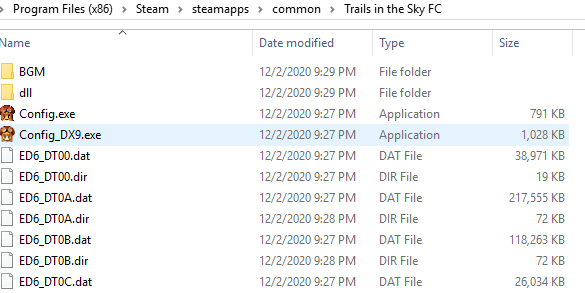
-
Optional, but recommended: download
SoraVoice_*.7zfrom SoraVoice, and extract its contents into the game directory.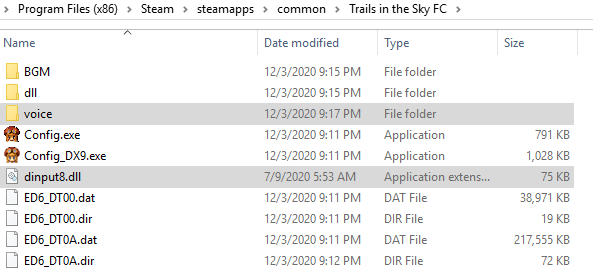
-
Download
en.fc_*.7zfrom SoraVoiceScripts. It will contain ascena/folder; place that inside thevoicedirectory.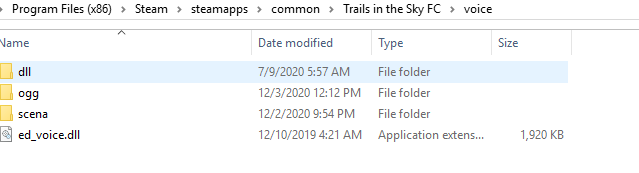
-
If you wish, install the voice files themselves. These are most easily downloaded from archive.org. The voice files go in the
oggdirectory, depicted above. -
Install LB-ARK and run its
move_sora_voice.ps1script. This is a small system that simplifies various aspects of Sky's file handling. -
Check that the mod is running. An easy way to do this, aside from just checking if there are voices playing, is that it will create a file named
ed_voice.iniin thevoicedirectory. If this file is not created, something went wrong.
If you've gotten curious and looked inside the ._sn files, you may have
noticed that they are just binary data. This format is suited for the game to
read, but it is not readable by humans. To convert them to something that is
useful for humans, we will use Calmare. Simply download the latest
calmare.exe and place it somewhere easily accessible.
Next, go to data\ED6_DT01 and drag c0100._sn onto calmare.exe. A c0100.clm
file will appear next to it, with a (hopefully) nice and readable syntax. To
convert back to ._sn, simply drag the .clm file onto calmare.exe again.
Hopefully, this guide will help you, aspiring Sky modder, set up your game to properly mod your game!
As you may expect, prior experience with coding/scripting is extremely beneficial. However, this guide is aimed to be accessible even for those who have not programmed in the past. Each line of code that we examine will be explained via comments, so we hope this will be easy to understand even for the newest of bracers!