Step 6: Character Sprites (Chips)
Up until this point, we have not had to manually change character sprites.
However, the game has already been handling the basic character sprite changes
for us; when a character changes direction or moves, the game is automatically
changing the character's sprites to show their walk/run animation. Of course,
there are many different character sprites for each character, so there may be
times when we would like to switch their sprites. For that, we can use the
CharSetChipBase and CharSetChipPattern functions!
First off, let's note that the game refers to sprites as "Chips". It's not immediately what the reason is behind this naming convention, but any reference to chips will in fact be talking about sprites.
Let's start by learning about patterns. For this, let's take a look at t0310
for a scene in the prologue of FC, when Estelle and Joshua are talking to
Cassius about their bracer training. In this first clip, as Cassius asserts his
dominance over the Bright household, Joshua turns to look at Estelle.
Shortly afterwards, Estelle looks at Joshua and reveals how much she's been paying attention.
Here's this scene in the code:
	TextTalk char[0] {
		#19622v#081FThat's the spirit!
		Let's see what you're made of then,
		shall we?{wait}
	}
	TextWait
	CharSetChipPattern char[1] 2
	Sleep 300ms
	TextTalk char[1] {
		#07618v#017F#6PLet's not start a rivalry here, you two...{wait}
	} {
		#07619v#010FAnd Estelle, keep your focus on the task at
		hand.{wait}
	} {
		#07620v#010FWe have a test later on today, remember?{wait}
	}
	TextWait
	CharSetChipPattern char[2] 1
	Sleep 300ms
	TextTalk char[2] {
		#00084v#004FHuh...?! {wait}
	} {
		#00085v...{wait}
	} {
		#00086v#501FWait...what test?{wait}
	}
	TextWait
Here, we can see the first function that we'll be covering: CharSetChipPattern.
CharSetChipPattern char[1] 2
In chapter 5.2, we covered how we can use CharTurnToChar and
CharTurnTo to have characters turn to face another character or a specific
direction. However, in this case, Joshua and Estelle aren't turning their
bodies; rather, they're only moving their heads. There is no specific
functionality for rotating only the head; instead, these head-turned images are
a different sprite sheet! Using Cradle, we can convert sprite images (which
are chcps) into png files for viewing. Here's
Joshua's sitting sprite, npl/ch000131 (lightly edited for browser
viewing):
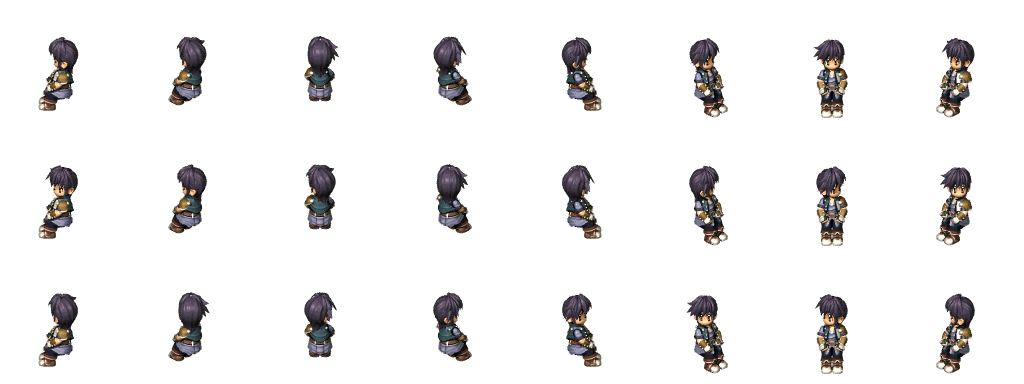
And here is where the pattern comes into play! The top (0th) row is Joshua
looking straight ahead, viewed from all eight directions. The middle (1st) row
is similar, except Joshua looks to the left. Finally, the bottom (2nd) row is
Joshua looking to the right, just like what happens in this scene. As such,
CharSetChipPattern takes in 2 as its second parameter here to get Joshua to
look to his right. Similarly, when Estelle looks to her left, she uses 1 as the
2nd parameter. Turning heads while sitting down is just one example of using
CharSetChipPattern to switch between different sprites in the same sprite
sheet.
It is unclear what exactly npl means, but sprites in this folder refer to
humans. There is also mons for monsters, and apl for miscellaneous.
So now that we've learned how to use different sprites in the same file, or
patterns, but how can we switch to sprites in different files? For this, we'll
use CharSetChipBase!
Let's take a look at c0302 for at a scene in the FC prologue, when Josette
sheds her Jenis Royal Academy uniform to reveal her true colors.
Here is the code for this scene:
		TextTalk char[0] {
			#18184v#219FHey, that's my line!{wait}
		}
		TextWait
		Fork char[0] fork[2]:
			CamZoom 3000 1000ms
		Fork char[0] fork[3]:
			CamLookPos (-60120, -80, 3200) 1000ms
		Sleep 500ms
		EffStop eff_instance[0] 0
		SoundPlay sound[203] 0 0 100
		CharTurnTo char[0] 32deg 800deg/s
		CharSetChipBase char[0] chip[0]
		CharTurnTo char[0] 330deg 800deg/s
		CharTurnTo char[0] 180deg 800deg/s
		Sleep 500ms
		ForkWait char[0] fork[2]
		TextTalk char[0] {
			#18185v#210FAll right boys, get 'em!{wait}
		}
		TextWait
Up until this point, we've been able to read and write code in one section of
the file without worrying about anything else in the file. However, looking
within this function, there is no list of sprites for CharSetChipBase to
refer to. In fact, this information is up at the top of the file, in these
lines:
chip[0] "npl/ch00310._ch" "npl/ch00310p._cp" // Josette walking, shown below
chip[1] "npl/ch00311._ch" "npl/ch00311p._cp" // Josette running
chip[2] "npl/ch00314._ch" "npl/ch00314p._cp" // Josette kneeling
chip[3] "npl/ch00360._ch" "npl/ch00360p._cp" // Sky Bandit walking
chip[4] "npl/ch00361._ch" "npl/ch00361p._cp" // Sky Bandit running
This lists two filenames per line, but they are almost always the same but with
a p and a different extension. Unless you want to create custom sprites, you
won't have to pay much attention to that part.
Anyway, this is where sprite information for NPCs is stored! Since Estelle and
Joshua are name[n], their sprite information is normally read from
t_name._dt rather than from this list. But Josette is a char[n], so she
will be using data from here.
Now, checking our CharSetChipBase, we are looking for chip[0].
We see that this is npl/ch00310, which looks as below:
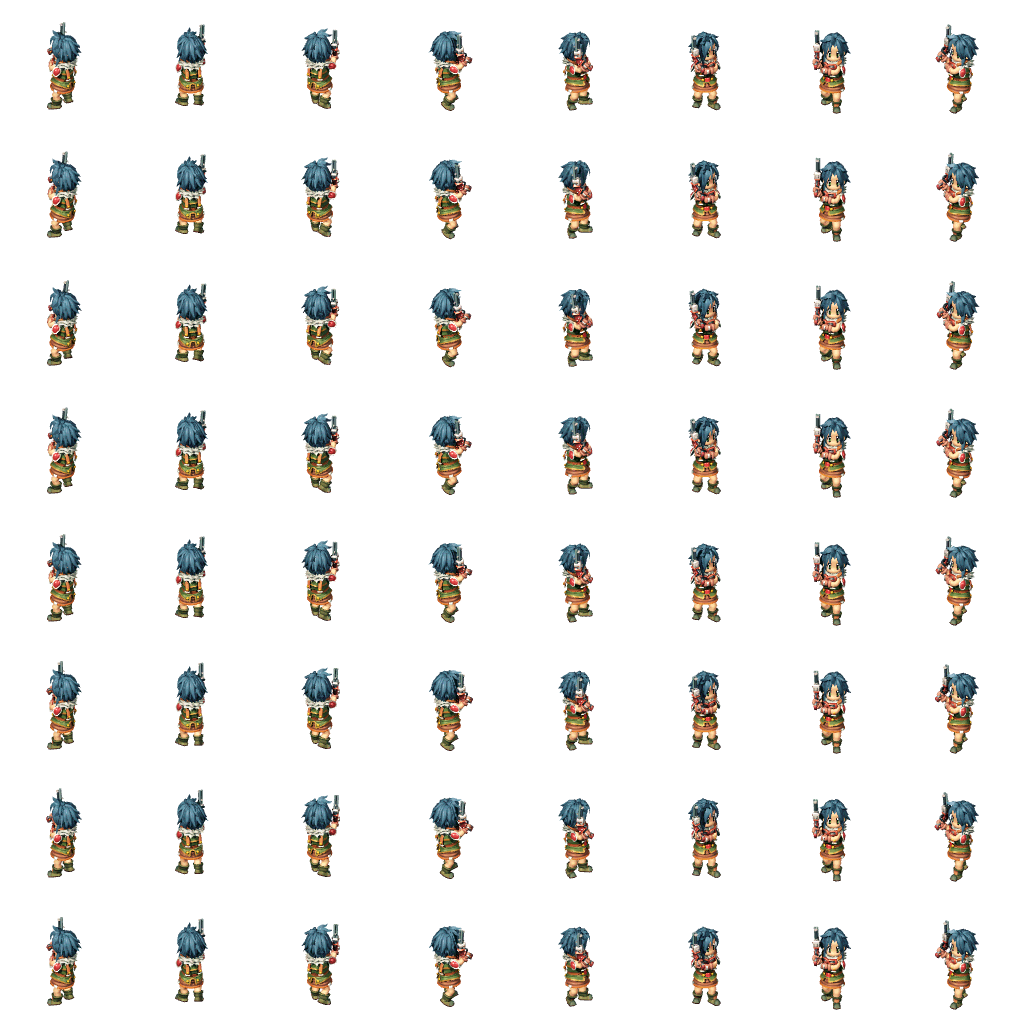
Now that we know how to choose a sprite for our character, we can alter our
CharSetChipBase function call to select a different sprite; better yet, we
can even change the contents of the chip[n] declarations to bring in sprites
that weren't originally in the file!
Let's try to change what sprite Josette transforms into by swapping her sprites with someone else's.
chip[0] "npl/ch00160._ch" "npl/ch00160p._cp" // Tita walking
chip[1] "npl/ch00161._ch" "npl/ch00161p._cp" // Tita running
Note that in this case, we've changed both chip[0] and chip[1], replacing
them with Tita's standing and running sprites respectively. Now, look at what
happens when Josette transforms!
Now, we've changed both Josette's standing and running sprites. While we
haven't had to worry about the difference between standing and running sprites
up until now with our party members, NPCs don't have any of these behaviors
built in. Let's check what happens if we replace only chip[0], leaving
chip[1] as-is:
The game engine will not know to look for Tita's running sprite just because
her standing sprite is being used -- if you look a little farther down, there's
another line CharSetChipBase char[0] chip[1], so it'll simply use that sprite
and not care which character it portrays.
Using the CharSetChipBase and CharSetChipPattern functions, we can customize what
our characters look like, giving us a whole new level of opportunities for
custom stories!